
Emoji reactions for GitHub
by sydney5.0
3 reviews
67
users
Published
July 31, 2024
Screenshots
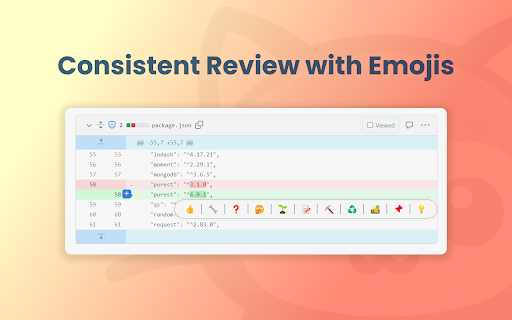


Description
📦 Emoji reactions for GitHub
Enhance your GitHub code reviews with intuitive emoji reactions. This Chrome extension allows developers to easily add emojis directly to code diffs for a more expressive and streamlined feedback process.
🔑 Key Features:
- 🚀 Emoji Integration in Code Reviews: Add visual context to your feedback by attaching emojis directly to code lines in GitHub. A simple, yet powerful way to express your thoughts and reactions.
- 😃 User-Friendly Emoji Picker: Select from a wide range of emojis through an accessible picker that appears as you hover over code lines. Tailored for coding contexts, it makes finding the right emoji quick and easy.
- 💬 Streamlined Commenting Process: Enhance communication efficiency in code reviews by using emojis as comments. A single click adds your chosen emoji as a comment, making your feedback more engaging and noticeable.
- 📚 Code Review Emoji Guide: Ensure meaningful emoji communication with our standardized guide, available at Code Review Emoji Guide https://github.com/axolo-co/developer-resources/tree/main/code-review-emoji-guide.
📲 Easy Installation:
Find us on the Chrome Web Store and add a new dimension to your code reviews.
🔍 Simple Usage:
1. Open a GitHub pull request or code review.
2. Hover to reveal the emoji picker on any line of code.
3. Select and click an emoji to add it as a comment.
The Emoji reactions for GitHub is all about making code reviews more efficient, expressive, and engaging. Try it today and transform your review process!
🆘 Support and Contact Information:
For assistance, queries, or feedback, please reach out to us at [email protected]. We can't wait to receive your feedback to improve this project even more!
👨💻 Developer Information:
Emoji reactions for GitHub is developed by Axolo, a company committed to enhancing engineering team collaboration and efficiency. Learn more about us on https://axolo.co
Add to Chrome
Quick Info
- Version
- 1.4
- Size
- 597KiB
- Price
- Free
- Type
- Extension
Categories
Languages
English (United States)