

LeetNote
by www.leetnote.io3.0
5 reviews
35
users
Published
April 21, 2023
Screenshots


Description
LeeNote = Leetcode + Spaced-Repetition-Review Notebook
Q1: Have you ever faced the situation when you completely forget the solution of a problem you solved it before?
Q2: Are you preparing for technical interviews or coding competitions and looking for a more efficient way to learn algorithms and data structures?
GET STARTED
* Install LeetNote extension
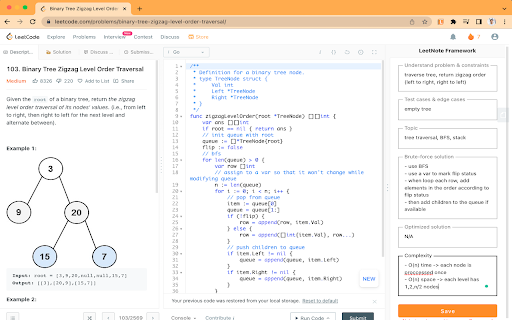
* Go to any problem page on leetcode.com, the Leetnote sidebar should show up
* Take notes using the sidebar
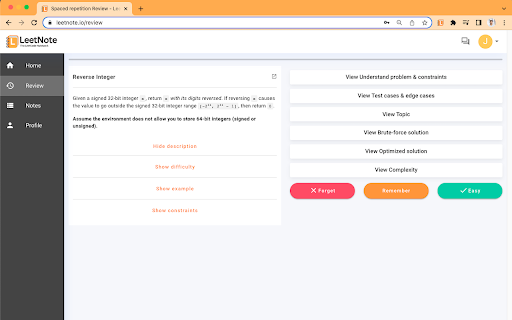
* Go to LeetNote.io to view saved notes or review with spaced-repetition
KEY FEATURES
* An optimal step-by-step framework to tackle any Leetnote problem
* Chrome extension to easily access Leetcode questions and take notes right on the page
* Spaced-repetition algorithm to help you retain information better and learn faster
* Web app with a clean and user-friendly interface for optimal reviewing experience
HOW IT WORKS
The Leetcode Spaced-Repetition Notebook uses a scientifically proven learning technique to increase your retention and comprehension of coding concepts. The tool will track your performance on Leetcode questions and present them to you at the optimal interval for maximum learning efficiency. With the Chrome extension, you can practice Leetcode problems right on the website and the Web app will store all your progress and performance data.





