Sitecore Icon Search
by Gabe5.0
2 reviews
602
users
Published
July 20, 2022
Screenshots

Description
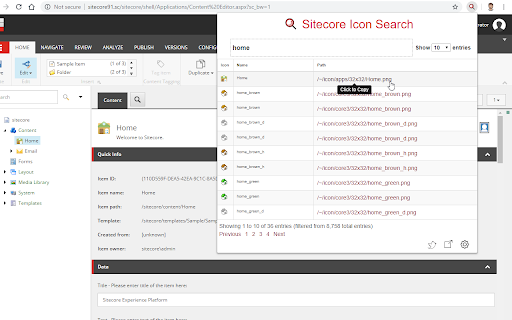
The Sitecore Icon Search Google Chrome extension is a converted version of the Sitecore Icon Search Web App. It assists developers to search and add Sitecore icons without ever leaving the tab.
1) Navigate to a template or item and click the Icon field.
2) Click the Sitecore Icon Search extension icon.
3) Search and click the icon link you want to use.
The extension automatically:
- Enables the Standard Fields checkbox under the Views tab in the Ribbon (if it's not already enabled).
-Sets the Icon field under the Appearance section to the selected icon (user does not need to select the Icon field). A copy of the selected icon's relative path will still be copied to the clipboard.
-Saves the item.