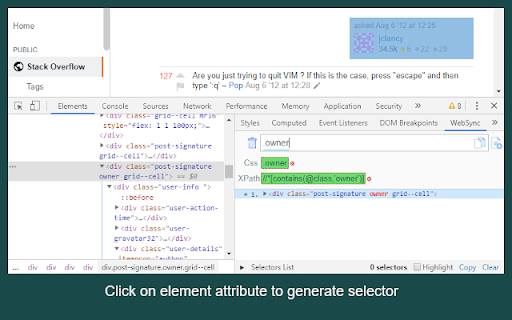
WebSync: Generate & Validate Selectors
by wsbaserScreenshots
Description
Quick Info
- Version
- 0.1.1
- Size
- 2.93MiB
- Price
- Free
- Type
- Extension
Other extensions from this developer
To translate: ★ Press Ctrl+Space (Shift+Space for Mac), type the word, press Enter. ★ Select the word, press Ctrl+Space (Shift+Space for Mac). Netflix: Click on the word in subtitles will stop video and display translation. Pressing Space key will hide Cool Translator and start video...
Other extensions published on the same day
Minutes is a straightforward and user-friendly time tracking extension that simplifies the process of monitoring your work time. Download the extension, start a new session and continue work as normal. Once you end your session, review records of your active and idle time allowing you to reflect...
"Browser Bible" is a powerful and user-friendly Chrome extension that empowers you to delve into the depths of the Scriptures. With a wide range of Bible translations at your fingertips, you can effortlessly search for specific verses and explore the profound wisdom contained within. Using the...
TrackDen is a browser extension that helps you organize your Bandcamp music collection and automate many of the tasks involved in putting together playlists and purchasing tracks. * Sync your current collection, cart and wishlist. * Add individual songs and whole albums to your library. *...
A extensão 'Enviar mensagem na agenda/busca do e-SUS' é uma solução prática e eficiente para profissionais de saúde que utilizam o e-SUS APS. Com essa ferramenta, é possível transformar os telefones dos pacientes na tela de agenda e na tela de busca em links clicáveis para o WhatsApp Web, desde...
Wolkvox RPA Inspector es una valiosa ampliación de Wolkvox RPA, una herramienta de automatización robusta y flexible. Esta extensión se ha diseñado para facilitar la captura de elementos web y agilizar la programación de automatizaciones dentro de la plataforma Wolkvox RPA. Wolkvox RPA...
When your cursor is frolicking in an input field, the SwiftPaste magic can be conjured up by pressing the keyboard shortcut (default: Ctrl+Shift+Space). 🌐 Works on ANY input (okay, not every single one, but we've got pretty darn good coverage!) 📚 Endless storage of suggestions! 1,000? 10,000?...
Cung cấp bộ gõ thay thế cho bộ gõ mặc định của Chrome OS Giúp cải thiện trải nghiệm gõ tiếng Việt trên Chrome OS Sau khi cài đặt, bạn cần vào Settings, search "input method" -> Manage Input Method -> Add Unikey Sau đó có thể dùng Ctrl+Space để chuyển đổi giữa các bộ gõ