

OneClick AI
by OneClick AI5.0
4 reviews
57
users
Published
November 2, 2025
Screenshots


Description
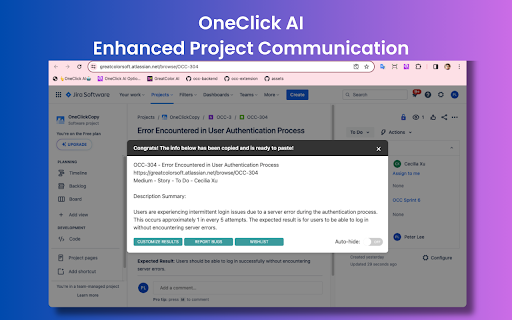
👆 OneClick AI 🤖 is a powerful tool that assists businesses and individuals in streamlining their workflows by extracting and summarizing content with a single click. This extension can significantly boost productivity in project management, cross-team collaboration, individual research, and information sharing. Additionally, you have the flexibility to customize the appearance of your results. All extracted data is conveniently copied to your clipboard, ready for immediate use.
🎉 Feature Highlights
==================
✅ One-click Extracting: Generate concise and informative summaries of complex documents with a single click. All essential elements, including the title, URL, summary, and translation, can be generated simultaneously.
✅ Multilingual Summarization: Eliminate language barriers and promote global collaboration with our multilingual summarization capabilities. Effectively summarize a wide range of news articles and other content.
✅ Enhanced Project Management: Simplify knowledge sharing within your organization by creating and sharing summaries of important documents and insights.
✅ Empowered Individual Research: Empower individual research efforts by generating comprehensive summaries of webpages, articles, and other sources. Tailor the extraction of key information, such as author, source, URL, and other relevant details, to your specific needs.
✅ Results Auto-copied to Clipboard: All the extracted and summarized content is auto-copied. No further action is required; you can directly paste the content from the result window.
🚀 Quick Start Tips
==================
Please see How Can I Activate OneClick AI (https://www.greatcolor.ai/faq)
📌 Option 1: Click the Extension Icon on the Toolbar
📌 Option 2: Right-click to Open the Context Menu
📌 Option 3: Press the Keyboard Shortcut
📌 Option 4: Right-click the Extension Icon on the Toolbar
🙋♂️Why OneClick AI?
==================
Whether you need to share critical project updates from platforms like Jira or Slack, disseminate lengthy news articles from sources such as CNN or Fox, or manage overwhelming comments on tweets, our extension streamlines the process. OneClick AI enables you to effortlessly consolidate essential information - project titles, URLs, task details, meta info, and concise summaries in your preferred language - into a single, clear message. It also simplifies summarizing comments while maintaining the source of the original post for easy reference. With OneClick AI, missing details become a thing of the past, ensuring your team or peers receive all necessary information at first glance.
🙋♂️Is OneClick AI free to use?
==================
Our product is currently free to use, but we may introduce paid features or premium options in the future as we expand and improve. Any changes to our pricing will be communicated in advance to ensure transparency with our users.
🙋♂️What browsers are supported by OneClick AI?
==================
We currently support the following browsers: Google Chrome
🙋♂️Which AI model does OneClick AI use?
==================
Currently, OneClick AI uses OpenAI GPT 3.5 and/or 4. In the future, we may switch to using other AI models.
🙋♂️How often is the extension updated?
==================
Our team will do our best to gather customer feedback and update the extension as soon as possible.
📖 Release Notes
==================
See also: http://bit.ly/OneClickAI-ReleaseNotes
📬 Contact us
==================
Any questions or suggestions? Please contact us at info < at > greatcolor.ai
You can report bugs or join the wishlist (https://www.greatcolor.ai/contact), or become part of our Discord community (https://discord.gg/99gMZYB6bc)
Add to Chrome
Quick Info
- Version
- 1.8.7.25306 (11/02/2025)
- Size
- 2.0MiB
- Price
- Free
- Type
- Extension
Categories
Languages
English (United States)


