Single Window (open links in active window)
by emano.waldeck3.7
21 reviews
20.0K
users
Published
November 25, 2025
Screenshots
Description
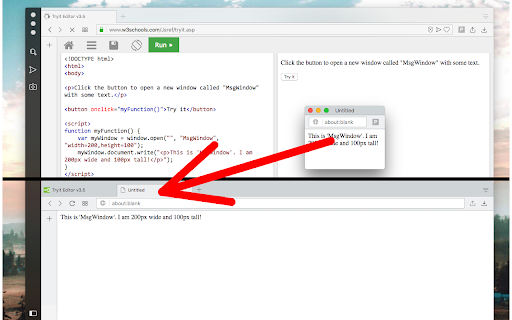
This extension prevents web pages from opening pop-up windows of any kind. When the extension is enabled, all newly opened windows will get directed to the active window (in the currently active window before this window gets opened). You can toggle the extension on and off from the toolbar button to enable the single-window mode or disable it. When the extension is enabled, all windows are forced to stay in the same active window. So if a website issues a popup window, instead the extension moves the newly created popup window into the active window and then focuses on this newly created window (same as dragging a tab from one window to another window). When the extension is disabled, popup opening is permitted.
Usage Preview:
https://www.youtube.com/watch?v=6mFKwmlt6RU
Notes:
Even if the extension is enabled, the user can still open new windows using Ctrl + N or Command + N shortcuts. Also from the 3-dot -> New Window menu.
This extension does not intercept incognito (private) windows.
This extension does not intercept extension windows (extensions are still permitted to open. their popup windows).
Version Log:
0.1.3:
The new tab will get focused. Now you can use command-line tools to open in a new window and get your tab focused
0.2.0
Moves to manifest v3