
Cookie Deleter
by Jasmin3.3
4 reviews
804
users
Published
May 1, 2023
Screenshots
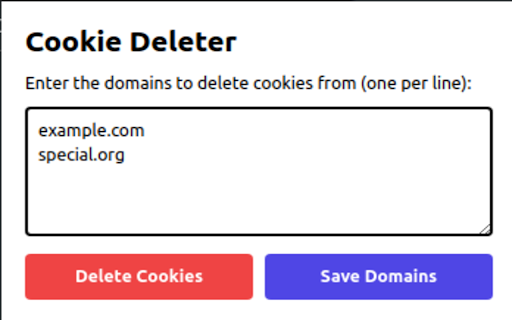
Description
Cookie Deleter is a user-friendly and lightweight Chrome extension designed to help you manage and delete cookies for specific websites. It enables you to maintain a customizable list of domains for which cookies should be automatically deleted whenever you visit them. By offering an easy way to manage cookies on a domain-by-domain basis, this extension aims to enhance your privacy while browsing the internet.
New Functionality:
In addition to the core features, the Cookie Deleter extension now includes a "Save Domains" button, allowing you to save your list of domains for future browsing sessions. This feature ensures that your preferences are retained and applied consistently across different browsing sessions.
How to use Cookie Deleter:
1. Install the Cookie Deleter extension from the Chrome Web Store.
2. After installation, click on the Cookie Deleter icon in your browser's toolbar to open the extension's popup.
3. In the popup, enter the domains you'd like to manage in the textarea, one domain per line, without the "http://" or "https://" prefix. For example:
example.com
anotherdomain.net
somedomain.org
4. Click the "Save Domains" button to store your list of domains. The extension will remember these domains and automatically delete cookies for them when you visit these sites.
5. If you want to delete cookies for the saved domains manually, click the "Delete Cookies" button in the popup. This will remove cookies for all the domains listed in the textarea.
To update or modify the list of domains:
1. Click on the Cookie Deleter icon in your browser's toolbar to open the popup.
2. The textarea will display the list of previously saved domains. You can add or remove domains as needed.
3. Click the "Save Domains" button to save your updated list.