

Download All Files
by Flying Cactus5.0
12 reviews
1.0K
users
Published
December 16, 2025
Screenshots


Description
Download all files from any page instantly.
Stop saving items one by one. This extension scans the page, collects every file, and lets you save everything in seconds. It’s also helpful when you need a simple way to bulk file download without extra steps.
What it does for you
• Finds every file on the page (PDFs, documents, images, audio, video, ZIPs, and more)
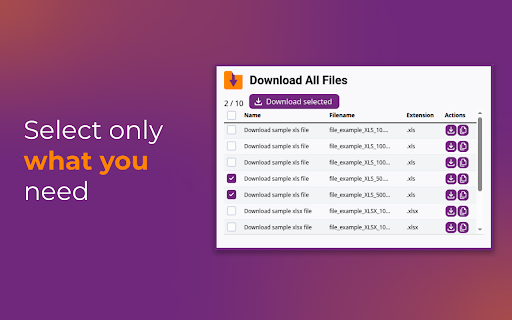
• One click to save everything - or select only what you need
• Safe & private - works only when opened, no tracking, no background scripts
If you often need to download all links from a page, the extension will gather them into a clean list so you can pick and save them at once. Many users also use it as their all links downloader when collecting files from courses, research papers, or archives.
Get Download All Files - fast, simple, and reliable bulk downloading.
Add to Chrome
Quick Info
- Version
- 1.4.2
- Size
- 69.52KiB
- Price
- Free
- Type
- Extension
Categories
Languages
DeutschEnglishTiếng Việtespañolfrançaisitalianopolskiportuguês (Brasil)中文(中国)中文(台灣)日本語한국어


