Blackboard Grader
by TSamuel5.0
1 reviews
56
users
Published
April 12, 2023
Screenshots
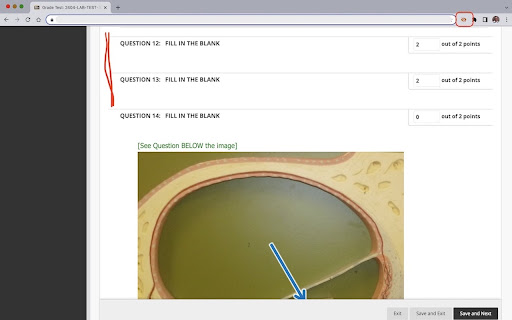
Description
This extension is intended for faculty at Austin Community College, who administer online tests on Blackboard. The extension does not alter the content nor interact with content on the LMS server. Faculty can use this to hide all questions marked as correct and to show only those that are either partially correct or incorrect.
Once added as an extension, the user may pin the extension to the extensions bar for easy access. The extension is designed to work on pages that contain test items with correct or incorrect markings. Once the page is displayed, click the extension's icon (it will appear in color if the page you are on is on www.austincc.edu) to hide the questions marked as correct. User may then change the grades for any question just they would do while grading.
Hitting the icon again or clicking the 'refresh' button or moving to the next page will unhide the hidden questions and you may choose to hide the correct questions on the next page by clicking the extension icon again.
No logins are required and no data about the user or the test item on display will be collected or stored by the extension.
USE SCENARIO 1:
During Grading: Manual review and grading becomes faster as you need to focus only on questions that are incorrect. Hiding the questions marked as correct eliminates unnecessary page scrolling and fatigue.
USE SCENARIO 2:
During Test Reviews: When you are discussing a test with a student during a review, hiding the questions marked correct helps you focus on the areas the student failed to do well.
If you are not a faculty member at Austin Community College and would like to use this on your Blackboard site, contact us by email.