Selection Rectangle Highlighting
by Martin Huber3.7
3 reviews
553
users
Published
February 17, 2023
Screenshots
Description
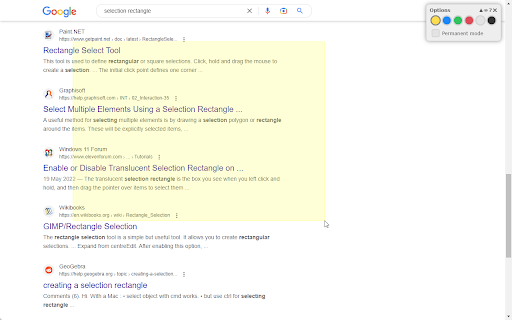
If you share your browser window during a presentation via Google Meet, Microsoft Teams, Skype or any other virtual meet-up tool, you can use this extension to highlight any area of the page that you show to your audience. This helps you to direct their attention to the points you are currently talking about.
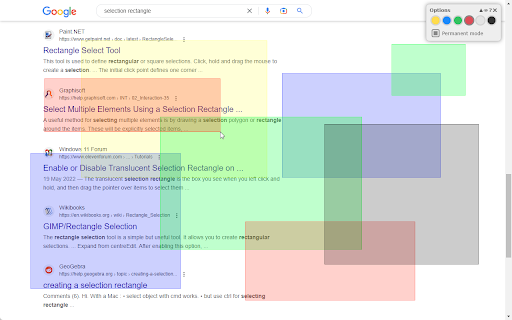
It works like the selection rectangle on your desktop: Press and hold down your mouse button and draw a rectangle. Once you stop holding the mouse button, the rectangle will disappear. If you activate "permanent mode", you can draw multiple rectangles that will remain visible until you remove them.
You can choose from different colors to adapt the selection rectangle and make sure it is clearly visible on the current page.
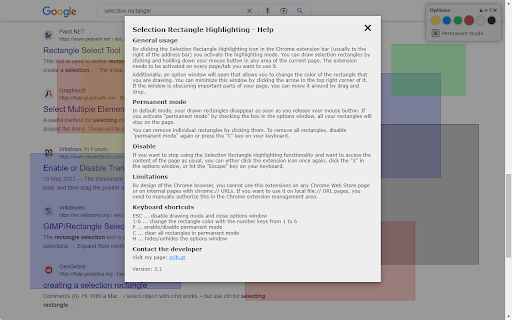
For more details, please have a look at the help screen of the extension.
Add to Chrome
Quick Info
- Version
- 2.1
- Size
- 22.82KiB
- Price
- Free
- Type
- Extension
Categories
Languages
DeutschEnglish