

GPT Organizer - Folder Manager for Custom GPTs
by GenEdge5.0
1 reviews
33
users
Published
June 23, 2025
Screenshots


Description
Most extensions help you manage chats. This one helps you manage your GPTs.
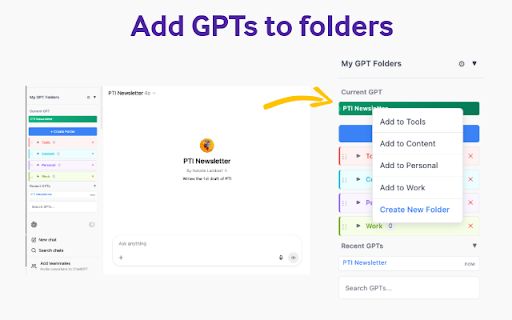
If you’ve created more than a handful of custom GPTs, you know how easy it is to lose track of them—and how many clicks it takes just to find the right one. GPT Organizer changes that. You can create folders, color-code them, and manage everything right in the ChatGPT sidebar—no popups, no tab switching.
🎯 Why GPT Organizer?
Finding the right GPT shouldn’t feel like digging through a junk drawer. With GPT Organizer, you can group your assistants by project, task, or topic and spend less time hunting—and more time getting things done.
✨ Key Features:
📁 Smart Folder System
• Create unlimited custom folders for your GPTs
• Organize by purpose, project, or any system that works for you
• Right-click any GPT for instant folder organization
• One-click access to all your organized assistants
• Rename your folders as needed
🎨 Visual Organization
• Current GPT highlighted with green gradient at the top
• Choose from 20 color themes for each folder
• Instantly recognize folder types with color coding
• Dark/light mode toggle that matches ChatGPT's theme
🔄 Seamless Integration
• Built directly into ChatGPT's left sidebar
• Right-click context menus for instant actions
• Search through all your organized GPTs and recent history
• Keyboard shortcuts (Ctrl+Shift combinations) for power users
• No popup windows or separate interfaces
• Expandable folders with inline GPT viewing
🚀 Easy to Use
• Add any GPT to folders with one click
• Drag-and-drop style organization
• Remove GPTs from folders instantly
Perfect for:
• Content creators managing specialized writing assistants
• Developers organizing coding and technical GPTs
• Businesses categorizing department-specific tools
• Students grouping study and research assistants
• Anyone with more than a few custom GPTs
How it works:
1. Install the extension
2. Click + Create Folder to make new folders
3. Visit any custom GPT on ChatGPT
4. Your current GPT appears highlighted at the top
5. Right-click any GPT to add it to folders instantly
6. Use search to find GPTs across all your folders
7. Click a folder name to rename it
Privacy & Security:
• All data stored locally in your browser
• No external servers or data collection
• Open source code available on GitHub
• Works entirely within ChatGPT's secure environment
Transform your ChatGPT workflow today - because great organization leads to greater productivity!


