

Smart Email Validator
by dixeam5.0
1 reviews
16
users
Published
December 1, 2024
Screenshots


Description
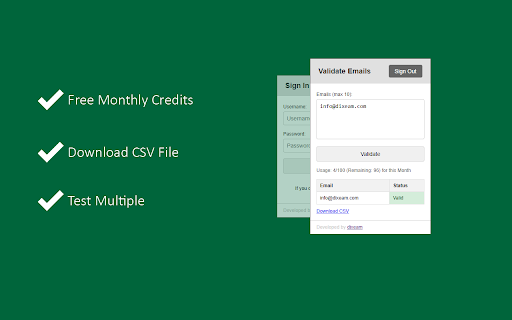
Smart Email Validator is a powerful Chrome extension designed to simplify email validation directly from your browser. Validate multiple email addresses quickly and get results on the go with enhanced API usage tracking and a user-friendly UI.
New Features and Updates:
1. API Usage Information Display:
Track your email validation API usage with real-time updates on API limits, usage count, and remaining validations. Usage details are displayed under the "Validate" button, providing you with insights on your available validations.
2. Enhanced User Experience:
Improved UI with distinct sections for account creation, activation, sign-in, and email validation. Users are guided seamlessly from sign-up to activation, ensuring a smooth onboarding process. Quick navigation between the validation results and usage information.
3. CSV Download for Validation Results:
Easily download your email validation results as a CSV file for further analysis or reporting.
4. Persistent API Usage Tracking:
API usage data is stored locally, ensuring your usage information is available even if you close and reopen the extension.
5. Account Activation Reminder:
Clear notification if your account is inactive, with instructions to complete the activation process.
How It Works:
1. Create an Account:
Sign up directly through the extension to start using Smart Email Validator.
Activate Your Account: Check your email for the activation key and enter it to activate your account.
2. Sign In:
Access the validation dashboard by signing in with your credentials.
3. Validate Emails:
Input emails (up to 10 at a time) and get instant validation results with color-coded status indicators.
4. Track Usage:
View your API usage limits and remaining validations after each validation request.
Version 2:
- For a better user experience, we removed the username from SignIn and SignUp. Now, users can register via Full name, Email and Password and can log in via Email and Password.
- Updated the UI added proper icon for better user experience






