

Better SPID
by sorgefrancesco974.0
1 reviews
15
users
Published
December 5, 2023
Screenshots
Description
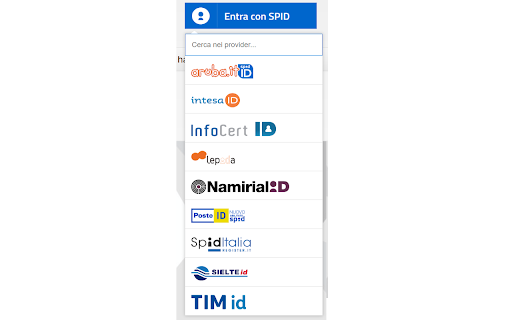
Ordina i fornitori del servizio SPID per nome, rimuovendo il fastidioso ordinamento casuale.
Aggiunge anche una casella di ricerca.
Other extensions published on the same day
Several SharePoint Sites using InfoPath forms do not support word-wrap for (HTML) text area elements. There are workarounds which require modifying style sheets (CSS) for each SharePoint Site. These workarounds need to be applied on a site-by-site basis, and they are not supported by some newer...

Introducing GA4BQ™ (BETA): The Google Analytics 4 BigQuery SQL Generator Extension for Chrome. This easy-to-use extension allows you to quickly and easily generate SQL queries for Google Analytics 4 on BigQuery without the need for any prior knowledge of SQL. With just a few clicks, you can...

Ne vous est-il pas déjà arrivé de vous plonger dans les mentions légales ou les conditions générales d'un site pour trouver le SIRET de la société qui l'édite ? Avec l'extension Chrome Rubypayeur, vous ne perdrez plus votre temps ! En un clic, l'extension fera ce travail de recherche à votre...

Website IP This extension will resolve the active tabs domain to an IP address. Features: - IPv4 support - IPv6 support - Click to copy IP address to clipboard - Simple UI Firefox version: https://addons.mozilla.org/en-US/firefox/addon/website-ip Contribute: This project is available on...

Make your course selection process at McMaster University a breeze with McMaster RateMyProf! This extension seamlessly integrates professor info from RateMyProfessors.com into McMaster University's MyTimetable! Key Features: *Instant Color-Coded Professor Ratings* After logging in to McMaster...

▼使い方 1. 拡張機能のアイコンを押下(ポップアップ表示) 2. 「変換したい文字列」と「変換後の文字列」に任意の文字列を入力 3. 「登録する」ボタンを押下(「変換したい文字列」と「変換後の文字列」を登録) 4. 「URLを変換する」ボタンを押下(登録した内容を基にURLの一部の文字列を変換する) ▼例 変換したい文字列: aaa、変換後の文字列: bbb (aaa →...

Volume mixer that lets you set the volume level for each tab seperately

This extension will replace the default 'New Tab' with an empty but neat 'New Tab'