Salesforce Org Banner
by Tim P5.0
1 reviews
636
users
Published
April 30, 2025
Screenshots




Description
Salesforce Org Banner
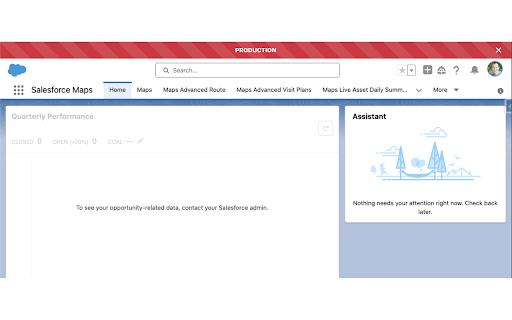
Effortlessly distinguish your Salesforce environments with visually distinct, customizable banners. Designed for administrators, developers, and power users, this extension enhances clarity, improves workflow efficiency, and reduces the risk of accidental changes in the wrong org.
Key Features
- Customizable Environment Indicators: Assign unique colors, names, and labels to each Salesforce org for quick identification.
- Popup Launcher: Quickly access tabs and entries with a search box.
- Advanced Tab Management: Create, rearrange, and manage tabs with drag-and-drop functionality.
- Chrome Tab Groups Support: Organize Salesforce environments using Google Chrome Tab Groups.
- Seamless Entry Management: Move entries between tabs and import/export them in JSON format.
- Modern UI: Enhanced tooltips, input validation, and usability improvements.
- Lightning Experience Compatibility: Fully optimized for seamless integration with Salesforce Lightning.
- Workflow Precision: Instantly recognize your current org to reduce errors.
- Built with Modern Frameworks: Reliable, fast, and efficient for managing multiple Salesforce environments.
Latest Release Notes
Version 1.5.0
- Feature: Added support for Salesforce’s new DevOps Center header.
- Enhancement: Improved banner display with reliable fallback strategy:
1. Uses DevOps Center header when available
2. Falls back to standard SLDS header with logout
3. Inserts custom banner as final fallback
- Fix: Resolved issue where maintenance announcements were incorrectly styled
Version 1.4
- Added support for dark mode.
- Added support for OS theme switching.
Version 1.3.2
- Removed unnecessary host permissions
Version 1.3.1
- Added support for Google Chrome Tab Groups (enable in options menu).
Version 1.3
- Introduced a popup launcher with tabs, entries, and a search box.
Version 1.2.1
- Fixed background color handling in options.
- Improved banner positioning on the login page.
Version 1.2
- Added tab creation, drag-and-drop, and scrolling support.
- Enabled moving entries between tabs and import/export in JSON.
- Improved duplicate detection (case-insensitive).
Version 1.1
- Enhanced UI with tooltips, input validation, and better subdomain validation.
- Fixed banner positioning and general rendering issues.
Version 1.0
- Initial release with customizable environment indicators and Salesforce Lightning support.
Add to Chrome
Quick Info
- Version
- 1.5.0
- Size
- 138KiB
- Price
- Free
- Type
- Extension
Categories
Languages
English (United States)