ApSIC Xbench Extension for Polyglot
by ApSIC, S.L.4.2
6 reviews
2.0K
users
Published
April 5, 2025
Screenshots
Description
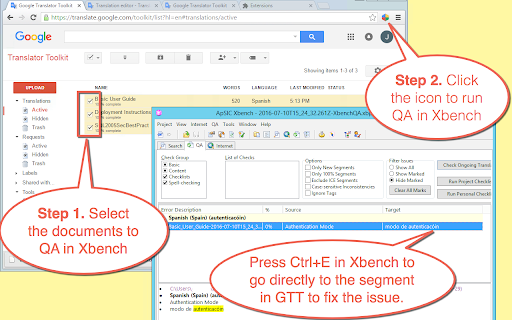
Instantly run QA with ApSIC Xbench on Google Polyglot files in four easy steps:
1. Go to the list of Google Polyglot documents
2. Select the documents to include for the Xbench QA.
3. Click the extension icon and wait for the documents to be downloaded.
4. Run QA with Xbench by double-clicking on the .xbp file that is downloaded.
To fix a translation issue found in Xbench, just select it in Xbench and press Ctrl+E. The Chrome browser will open the Polyglot document right at the segment.
NOTE: This extension requires Xbench 3.0 build 1602 or later installed on the machine.