
Lett Search With
by LettApp13
users
Published
June 15, 2025
Screenshots
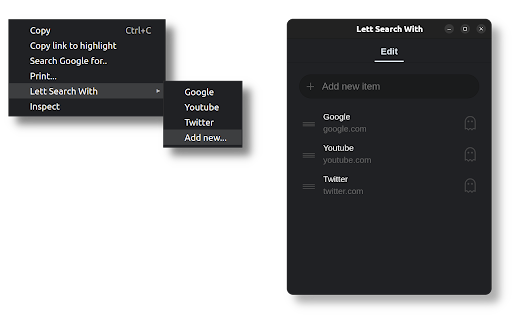
Description
With this extension you can achieve the following:
- Add multiple custom search engines.
- Order their presence in the Right-click context menu.
- Search for images.
- Search for selected text.
- Search from the address bar.
- Search from any website via prompt.
- Search InPrivate/Incognito mode.
To add a custom search engine you need a Name and URL:
- Click the extension icon.
- Type the name that will appear in the Right-click menu.
- In the URL, put %s where the query should go.
To perform an image search:
- Add a custom engine named [ImageSearch] with the desired URL
- Right-click on any Image > Image Search
To search from any website:
- Go to chrome://extensions/shortcuts
- Set the shortcut for "Prompt Search"
- When invoking the shortcut, type the engine name and your query.
To search from the address bar:
- Type the special keyword "lett" in the address bar.
- Type the name of the engine and your query.
For example:
lett youtube etc..
lett yt etc.. <- this will also work!
For Incognito search, add x to the search engine name:
lett youtubex etc..
lett ytx etc.. <- this will also work!
If you need assistance please refer to the Support Hub below.