
TubeSpy
by FreeDMTools4.4
14 reviews
664
users
Published
November 2, 2021
Screenshots
Description
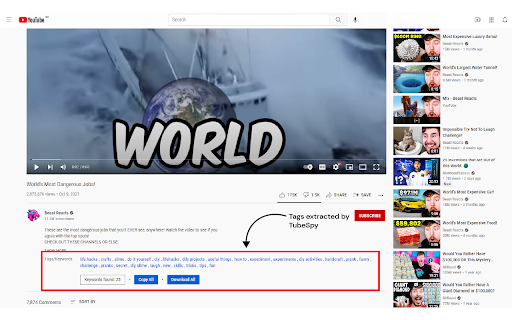
TubeSpy is a very simple and straightforward app to find the tags or the keywords every YouTube video is using.
The app is very easy to use! Just follow these few steps:
Step 1: Download and install the TubeSpy chrome extension.
Step 2: Open the YouTube video you want to analyze.
Step 3: Scroll down and just below the description, you will see a list of keywords/tags content creator is using.
* You don't have to do anything else! TubeSpy automatically shows all the keywords or tags under the video description.
* The best part is app is 100% free and all the upcoming features will be free forever.
Note: If the video creator did not use any keywords/tags, the tag section will remain empty.
Add to Chrome
Quick Info
- Version
- 0.0.3
- Size
- 58.55KiB
- Price
- Free
- Type
- Extension
Categories
Languages
English (United States)