Générateur de mot de passe
by julien dussart5.0
1 reviews
449
users
Published
January 5, 2024
Screenshots
Description
L'extension Générateur de Mots de Passe Sécurisés pour Chrome est votre compagnon ultime pour créer des mots de passe robustes et uniques en un seul clic. Conçue pour simplifier votre vie numérique, cette extension vous offre une manière rapide de générer des mots de passe fiables pour tous vos comptes en ligne.
Fonctionnalités principales :
Génération de Mots de Passe Forts : Créez des mots de passe aléatoires qui respectent les normes de sécurité les plus élevées. Les combinaisons de lettres, chiffres et caractères spéciaux assurent une protection optimale.
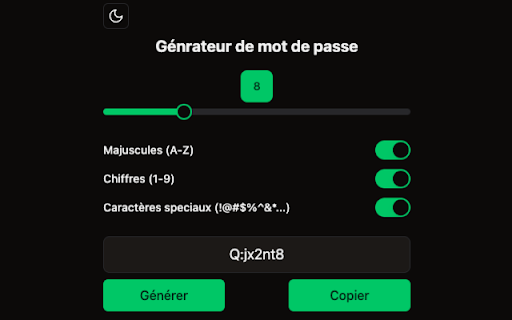
Personnalisation : Choisissez la longueur et les critères spécifiques (lettres majuscules, lettres minuscules, chiffres, caractères spéciaux) pour personnaliser vos mots de passe selon vos besoins.
Intégration Transparente : Une fois installée, l'extension s'intègre parfaitement à votre navigateur Chrome, vous permettant de générer des mots de passe directement depuis la barre d'outils.
Interface Intuitive : Une interface utilisateur conviviale et intuitive qui rend la génération de mots de passe aussi simple que quelques clics. Pas besoin d'être un expert en sécurité informatique pour protéger vos informations sensibles.