Turn Off :Cinema Mode
by simozin1.0
1 reviews
48
users
Published
February 11, 2025
Screenshots


Description
# Turn Off the Lights - Cinema Mode for YouTube
## Description
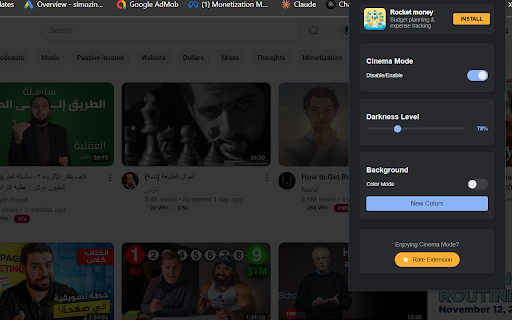
Transform your YouTube viewing experience with Turn Off the Lights - a sleek extension that creates the perfect **cinematic** atmosphere. When activated, it intelligently dims everything on the web page except for the video you are watching, simulating the cinema experience right in your browser.
## Key Features
- One-click activation: The entire page will be fading to dark while keeping the video bright
- Smart video detection: Automatically identifies and highlights YouTube videos
- Adjustable darkness: Customize the dimming level to your preference
- Dynamic color modes: Choose between solid black or gradient color backgrounds
- Smooth transitions: Elegant fade effects for a premium feel
- Video-centric design: Keeps video controls easily accessible
## How It Works
1. Install the extension
2. Navigate to any YouTube video
3. Click the toggle to activate cinema mode
4. Enjoy your video in a distraction-free environment
## Controls
- Enable/Disable toggle: Quick access to cinema mode
- Darkness slider: Fine-tune the dimming intensity
- Color mode: Switch between classic dark and gradient backgrounds
- New Colors button: Generate fresh gradient combinations
Perfect for:
- Late-night viewing
- Distraction-free watching
- Enhanced video focus
- Reduced eye strain
- Professional presentations
Experience YouTube videos the way they're meant to be watched - in a true cinematic environment.