Search Ebay Sold
by christensen143Screenshots
Description
Quick Info
- Version
- 1.0
- Size
- 10.58KiB
- Price
- Free
- Type
- Extension
Other extensions from this developer
Quickly close all tabs from a specific website with just a few clicks. Perfect for decluttering your browser when you have multiple tabs open from the same domain. 🎯 Simple & Fast Type a domain name (like "reddit.com" or "youtube.com") and instantly close all tabs from that website,...
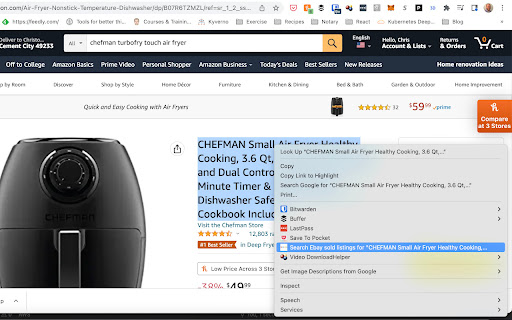
This extension adds an item to the context menu that searches eBay for items marked as sold that match the text that the user highlights on a webpage. The user highlights the text on a webpage; then, they right-click to bring up the context menu and choose "Search eBay for sold items" in the...
Other extensions published on the same day
Export tests from the DevTools Recorder panel to Testing Library test scripts using Jest. Open a recording and click export to use the Testing Library script option.
This is a chrome extension to customise codeforces and enhance user experience. Here are the current features: * Enhanced Blog View: - No need to scroll through all blogs! - All blogs in favourites, appear hidden, reducing scrolling. - Custom search bar to search blog titles you are looking...
Gymaholic - Fitness Motivation Quotes The daily Gymaholic health and fitness motivation quotes will inspire you to become the best version of yourself. This extension will help you get the right motivation to workout.
The easiest way to track your coaster credits. While on rcdb.com, you can click any checkbox next to a roller coaster and the extension will automatically add that roller coaster to your list. Features: - Can add and remove roller coasters through checkboxes on RCDB - Import and export your...
Built especially for Zendesk but will work on any platform. This app will allow you to hide and show any blockquote that you want to hide.
It's simple and replaces your current Chrome Tab with Cloudy Autumn Sunset Theme. HOW TO UNINSTALL: - Access the Settings on your Chrome browser - Check out the Appearance section - Right on the first row it shows which Themes are being used - Click on "Reset to Default" button on the right...
It's simple and replaces your current Chrome Tab with Celestial Eagle Theme. HOW TO UNINSTALL: - Access the Settings on your Chrome browser - Check out the Appearance section - Right on the first row it shows which Themes are being used - Click on "Reset to Default" button on the right side...