

마케팅 크롬확장 앱
by automatethem7
users
Published
July 22, 2024
Screenshots

Description
마케팅 크롬확장 앱
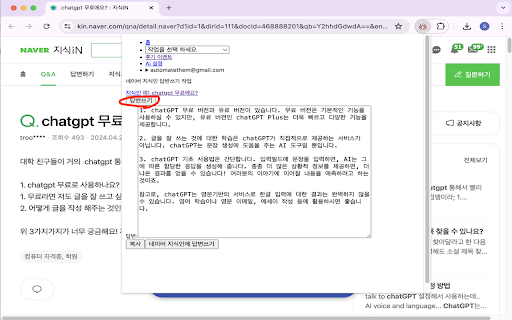
-네이버 지식인 답변쓰기 작업
*Ai 설정 탭에서 Openai api 키 를 입력후 사용 합니다.
Other extensions from this developer

This Chrome extension is organized into "Browser Extensions," "Additional Browser Extensions," and "Useful Utilities" categories within the pop-up page. The features provided for each category are as follows. [Browser Extension] It provides various functions such as screen capture, removal of...

-여러개의 웹페이지 컨텐츠(텍스트, 소스, 동영상 스크립트, pdf, 이미지, 음악, 동영상 등)에 대해 질문 혹은 재질문 할 수 있습니다. -여러개의 생성형 Ai에게 질문 혹은 재질문 할 수 있습니다. 또한 아래 추가 기능을 제공 합니다: 동영상 스크립트 추출: 유튜브 동영상 자막 데이터를 텍스트로 추출. 프롬프트 분할: 프롬프트가 길 경우 작은 프롬프트들로 잘라 생성형 Ai에게 질문.

컨텐츠 마케팅 크롬확장 프로그램 -네이버 지식인 답변쓰기 작업 *Ai 설정 탭에서 Openai api 키 를 입력후 사용 합니다.

브라우저에서 텍스트를 선택후 마우스 오른 쪽 클릭하면 다중 검색 하위 메뉴로 네이버 검색, 네이버 지식인 검색, 위키백과, 검색 구글 검색가 뜹니다. 특히 네이버 지식인 검색 하위 메뉴는 블로그 작성자나 콘텐츠 크리에이터들이 자신의 글에서 사용한 단어들을 바로 네이버 지식인에서 검색하고 관련된 질문에 답변을 다는데 도움을 줍니다. 아래는 블로그 주소가 포함된 지식인 답변 예시...

브라우저에서 텍스트를 선택후 나타나는 아이콘을 클릭하거나 마우스 오른 쪽 클릭후 나타나는 메뉴에서 네이버 지식인 검색을 클릭하면 선택한 텍스트를 지식인에서 검색합니다. 이 확장 프로그램의 사용으로 블로그 작성자나 콘텐츠 크리에이터들이 자신의 글에서 사용한 단어들을 바로 네이버 지식인에서 검색하고 관련된 질문에 답변을 다는데 도움을 줍니다. 아래는 블로그 주소가 포함된 지식인 답변 예시...


'경고창 닫기' 크롬 확장은 웹사이트를 탐색할 때 갑자기 나타나는 경고창을 자동으로 닫아주는 기능을 제공합니다. 이 확장을 통해 사용자는 웹 브라우저에서 발생할 수 있는 다양한 경고창을 편리하게 관리할 수 있으며, 필요에 따라 활성화 여부를 조정할 수 있는 옵션도 제공합니다. 활성화 체크박스를 통해 이 확장의 사용 여부를 쉽게 설정할 수 있으며, 특정 상황에서 경고창이 발생하는지 확인하고 싶을 때는 테스트 버튼을 눌러 브라우저의 반응을 확인할 수 있습니다. 이 기능은 사용자가 웹사이트를 보다 원활하게 탐색할 수 있도록...

크랜베리 Ai의 생산성 앱 추천 툴바는 생산성 앱 추천 블로그인 https://automatethem.tistory.com/ 의 플레폼별 생산성 앱 추천 카테고리에 편리하게 접속할 수 있게 해주는 하단에 생기는 툴바 형태의 크롬 확장 프로그램으로 생산성 웹, GPT, 크롬 확장, 북마크릿, 데스크톱, 모바일 앱 추천 링크를 제공합니다. 이 툴바는 추천 앱에 대한 설명을 링크 하고 그것에서 바로 앱을 다운로드할 수 있도록 합니다.
Other extensions published on the same day

This plugin adds a "LTI Debugger" pane in the developer tools which listens for LTI requests, and displays them as they resolve. It also parses JWT parameters, and displays them as navigable JSON. The "LTI" spec is an interoperability standard for web-based learning software published by...

Too many tabs? With Stash, batch save, quickly stash, easily recover. Stash makes it easier to save your window(tabs). And you can found them on stash list. By clicking the item, the tabs will be recovered.

Walless: Your Wallet-less Wallet for Web3 Introducing Walless, the revolutionary Web3 sandbox-wallet that transforms the decentralized world's user experience and brand engagement. With Walless, we make your Web3 life dead-simple, seamless and personalized. We believe everyone has their own...

it helps to know whats the website creator wants to hide with you, some time the functions like popup or drop-down show only when you click on them, but after clicking on this extension all the drop-down and hidden elements will will be shown up so you can figure it out whats going on it can...

A complete clone of the original Minesweeper game for Windows 🎮 Click the icon to enjoy your games!! 🖱️ Fully use Windows XP UI style 🕹️ Exactly the same interactive experience 📊 Various statistical parameters, besides click speed, 3bv, etc 🖵 The customized resolution to adapt to large...

この拡張機能は、Googleカレンダーへの予定追加を簡単に行うことができます。 選択したテキストやページタイトルを直接Googleカレンダーに追加することが可能です。また、右クリックメニューから直接Googleカレンダーを開くこともできます。 これにより、予定の管理が一段と便利になります。ユーザーの生産性を向上させるための強力なツールです。

Pre-schedule your Facebook group posts with ease. Save time and get more exposure on Facebook with the most powerful Facebook automation tool.
