Image to Text (Using AI)
by Jorvi242
users
Published
November 17, 2025
Screenshots


Description
Image to Text (Using AI) extension lets you create a related caption for any image by using artificial intelligence.
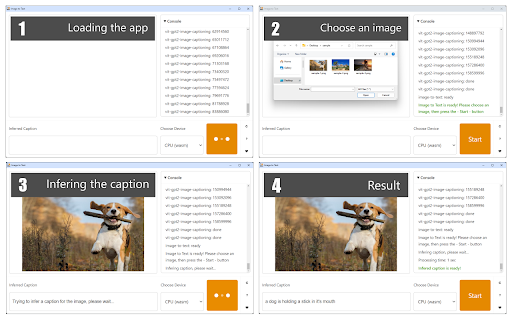
To work with this addon, please press the toolbar button to open the interface. Then, wait for the app to load completely. Once the addon is ready, please choose a desired image via the file selector (at the top). When the image is loaded, press the - Start - button. Depending on your machine, it takes up to a few seconds for the AI engine to generate a caption (at the bottom section).
Please note that this is still a work in progress and might not be able to generate a correct caption (text) for all images. Moreover, during the text generation process, you might see some lags or freezes in your browser. So please be patient until the AI engine completes the job. This addon uses a machine-learning library for the web called Transformers.js (https://huggingface.co/docs/transformers.js/). It also uses an image captioning library called VIT GPT-2 (https://huggingface.co/nlpconnect/vit-gpt2-image-captioning).
Note: When you first open the extension, it needs to download training data. The complete trained database for this addon is rather large (~1GB), so please be patient while it is being downloaded to your browser. Once the addon is ready, it does not need an internet connection to operate.
If you have a feature request or found a bug to report, please fill out the bug report form on the addon's homepage (https://mybrowseraddon.com/image-to-text.html).