YouTube Quick Search
by Trần Minh Sáng5.0
7 reviews
189
users
Published
August 14, 2024
Screenshots


Description
Instructions to use "YouTube Quick Search"
1. Install the Extension:
- Download and install YouTube Quick Search from the Chrome Web Store.
2. Enable/Disable the Search Icon:
- Click on the extension icon in the browser toolbar to open the popup.
- Use the checkbox to enable or disable the display of the search icon next to highlighted text on web pages.
3. Search on YouTube via Right-Click:
- Highlight any text on a webpage that you want to search on YouTube.
- Right-click on the highlighted text.
- In the context menu, select the "Search on YouTube" option.
- A new tab will open, displaying the YouTube search results for the selected text.
4. Search on YouTube via Search Icon:
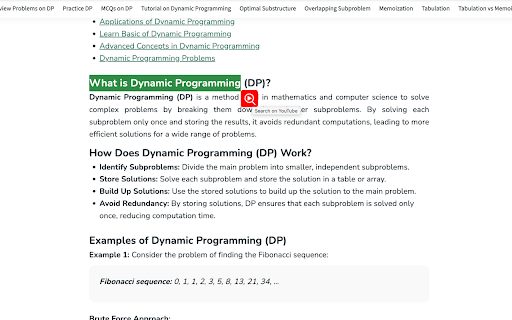
- If the search icon feature is enabled, highlight any text on a webpage.
- An icon will appear next to the highlighted text.
- Click the icon to instantly search the highlighted text on YouTube.
- A new tab will open with the YouTube search results.
5. Adjusting Settings:
- To change the extension settings, click on the extension icon in the browser toolbar.
- You can enable or disable the search icon feature from the popup window.
Tips:
- Quick Search: Use the right-click context menu option for a fast and easy way to search without having to navigate away from the page.
- Toggle Icon: If you prefer not to see the search icon on every selection, you can easily disable it in the settings.
Troubleshooting:
- Icon Not Appearing: If the search icon does not appear after text selection, ensure it is enabled in the extension's popup settings. If the problem persists, try refreshing your browser.
- Context Menu Option Missing: Ensure the extension is installed and enabled. If the problem persists, try refreshing your browser.