
Image Downloader
by VidHelper4.7
22 reviews
2.0K
users
Published
January 22, 2024
Screenshots


Description
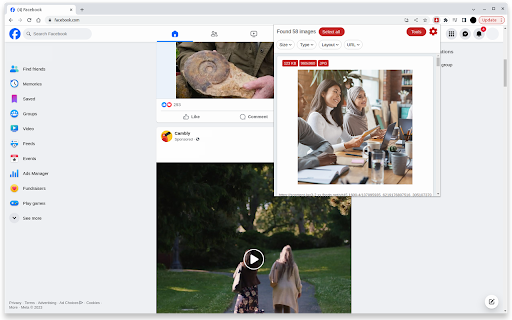
Downloading image materials with the extension is a simple process:
1. Navigate to the website containing the desired image materials.
2. Open the menu of the Image Downloader extension.
3. Download any images you find appealing.
--- Features ---
✅ Browse through images on the current page
✅ Apply filters based on size, width, height, type, or URL
✅ Download or open individual images in a new tab with just one click
✅ Save images to a designated subfolder
✅ Perform bulk image downloads
This extension is particularly useful as a social media image downloader, supporting image downloads from various websites. Some of the websites frequently used with our tool include:
instagram
Facebook
Twitter
Pinterest
LinkedIn
Snapchat
Add to Chrome
Quick Info
- Version
- 1.3.0
- Size
- 356KiB
- Price
- Free
- Type
- Extension
Categories
Languages
DeutschEnglishEnglish (United States)FilipinoIndonesiaKiswahiliMelayuNederlandsTiếng ViệtTürkçecatalàdanskeestiespañolfrançaishrvatskilatviešulietuviųmagyarnorskpolskiportuguês (Brasil)português (Portugal)românăslovenčinaslovenščinasuomisvenskačeštinaΕλληνικάбългарскирусскийсрпскиעבריתالعربيةفارسیमराठीहिन्दीবাংলাગુજરાતીதமிழ்తెలుగుಕನ್ನಡമലയാളംไทยአማርኛ中文(中国)日本語한국어