
PICAXE programmer
by www.picaxe.com2.0K
users
Published
December 5, 2016
Screenshots
Description
Windows/Mac/Linux users should now download from picaxe.com/progapp instead. This PICAXE downloader app is now for Chromebook users only.
When generating your PICAXE program online using the cloud version of Blockly for PICAXE you cannot download the program directly to the PICAXE chip. This is because web browsers do not allow online websites to access your USB/COM port for security reasons. Therefore the online Cloud version of Blockly simply saves onto your computer an ‘.axe file’ which is a compiled version of your PICAXE program.
This PICAXE Downloader App, because it is installed separately as a trusted Chrome extension app, can then open this .axe file and download it to your PICAXE chip via the AXE027 USB cable.
Note that you do not need this app for any other PICAXE software that is installed directly on your computer (PE6, AXEpad, Logicator etc.) as they can already program the PICAXE chip directly.This app is only required when using the cloud (web) version of Blockly for PICAXE.
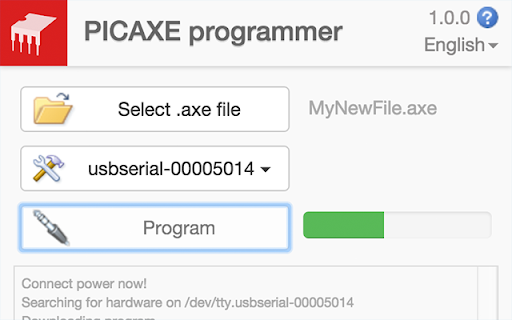
Using the Downloader App
- Click the ‘Open’ button and select the desired .axe binary image file
- Select the correct COM port for the AXE027 download cable
- Connect your PICAXE board and power and then click ‘Program’
Note that if you receive an 'update your Chrome version' upon running this app that is because your version of Chrome does not support the new API's required for PICAXE programming. You need v45 (or later) of Chrome to run this app.
See more at: http://www.picaxe.com/Software/Drivers/PICAXE-Programmer-App/
Add to Chrome
Quick Info
- Version
- 1.0.3
- Size
- 148KiB
- Price
- Free
- Type
- Extension
Languages
English (United Kingdom)




![The Last of Us Part 2 [#2] - ThemeLead](https://lh3.googleusercontent.com/9j3esmvGbZCC_YkL0njrqIwlKsoB4DI24gN50O1GbLiBILupRIg8DBUgq08gukaIdxf_tzG3WNaIqgOIndqIOs4bH1E)


