

Compress Image to 500kb » Convert JPG to 500kb
by SainiTij5.0
1 reviews
12
users
Published
March 16, 2025
Screenshots
Description
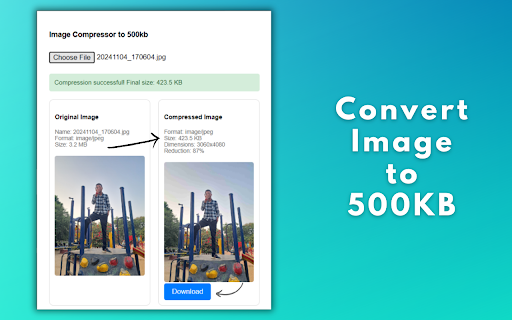
Image Compressor to 500KB is a lightweight browser extension designed to optimize digital content by reducing image file sizes while maintaining acceptable visual quality. The tool specifically targets web users, content creators, and professionals who need to quickly prepare images for uploads, emails, or web content without using complex software.
Key Features:
Smart Compression Algorithm:-
Automatically reduces images to ≤500KB through quality adjustment and intelligent resizing.
Preserves dimensions whenever possible, only resizing when absolutely necessary.
Converts all formats to optimized JPEG for maximum size reduction.
Transparent Processing:-
Real-time preview of original vs compressed images
Detailed metadata comparison (file size, dimensions, format)
Visual progress indicator during compression
User-Centric Workflow:-
One-click file selection and automatic download
Side-by-side visual comparison
Clear status updates (success/failure messages)
Privacy-First Approach:-
All processing done locally in the browser
No image data transmitted to servers
Instant automatic cleanup of temporary files
Technical Implementation:-
Built using modern web technologies (HTML5 Canvas, Web Workers)
Utilizes Chrome's native downloads API for secure file handling
Progressive quality reduction (0.9 → 0.2) with geometric scaling fallback
Adaptive compression based on MIME-type detection
Compatibility:
Supports all modern image formats (JPEG, PNG, WEBP, BMP)
Works with files up to 25MB (browser memory limits)
Responsive UI optimized for desktop Chrome




![2025 » TeraBox Link Video Viewer Online [Direct Download Link Generator]](https://lh3.googleusercontent.com/y9JP4ct2uC4DzUkD6mfzYg5heKbKJV3qZbaf7CCkIW4Ha_90tpCoq6MH_uG368EVyu4QpIFw2-ijC1pjkT5CliXesA)


