Crop It!
by Paul Li3.1
11 reviews
9.0K
users
Published
December 7, 2021
Screenshots



Description
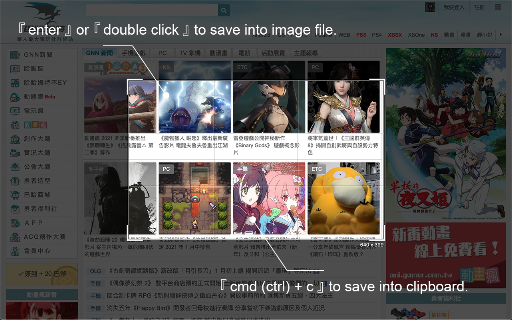
Use 「Crop It!」 to crop the exactly screenshot you need. Users could choose to save the screenshot into a file or clipboard.
- Here comes several ways to turn on 「Crop It!」.
1. Turn on contextMenu & choose 「Crop It!」.
2. Use keyboard shortcut > 「Cmd (Ctrl) + . 」.
- Usage instructions:
1. Turn on 「Crop It!」.
2. Adjust the selection size & position you need. (Users could press keyboard 「Esc」or click overlay to turn off 「Crop It!」)
3. Right-click on selection, there will be many aspect-ratio to choose.
4. Double click the selection or press keyboard 「Enter」 to save screenshot into a image file. Or press 「Cmd (Ctrl) + c」to save screenshot into clipboard.
Otherwise, users could always use options to set overlay's color or opacity they like.
- Change Log:
1.0.8
a. Fix shortcut > f issue.
1.0.7
a. Fix shortcut issue.
1.0.6
a. Migrate to MV3.
b. Performance enhancement.
1.0.5
a. Add keyboard shortcut >「 Shift 」when resize selection for fix its aspect-ratio.
b. Unify system UI & dark mode support.
c. Unfreeze scroll-lock when 「Crop It!」turn on.
d. Minor bug fixed & performance enhance.
1.0.4
a. Add aspect-ratio picker for different usages.
b. Add keyboard shortcut >「 f 」for quick expand / shrink selection to fullscreen.
1.0.3
a. Add keyboard shortcut guide (「 Shift 」 + 「 ? 」) & performance enhance.
1.0.2
a. Add keyboard shortcut > 「 ↑ 」、「 ↓ 」、「 ← 」、「 → 」to move selection strictly.