Case Cat
by Austen Morgan3.5
13 reviews
1.0K
users
Published
January 5, 2023
Screenshots
Description
𝗨𝘀𝗮𝗴𝗲
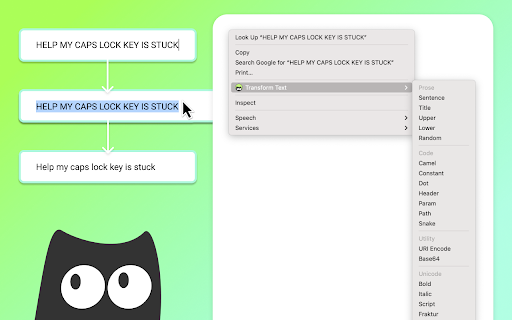
1. Highlight some text and right click on it.
2. Hover over 'Transform Text' in the menu and choose a format.
3. The transformed text is copied to your clipboard. Optionally, Case Cat will attempt to replace the selected text on the page.
☝️ Text replacement works well in text boxes, but can be inconsistent elsewhere.
𝗙𝗼𝗿𝗺𝗮𝘁𝘀
Prose
---------
Sentence: Fluffy feet
Title: Fluffy Feet
Upper: FLUFFY FEET
Lower: fluffy feet
Random fluFFY fEeT
Code
---------
Camel: fluffyFeet
Constant: FLUFFY_FEET
Dot: fluffy.feet
Header: Fluffy-Feet
Param: fluffy-feet
Path: fluffy/feet
Snake: fluffy_feet
Utility
---------
Base64: Rmx1ZmZ5IGZlZXQ=
URI Encode: Fluffy%20feet
Unicode
---------
Bold: 𝗙𝗹𝘂𝗳𝗳𝘆 𝗳𝗲𝗲𝘁
Italic: 𝘍𝘭𝘶𝘧𝘧𝘺 𝘧𝘦𝘦𝘵
Script: ℱ𝓁𝓊𝒻𝒻𝓎 𝒻ℯℯ𝓉
Fraktur: 𝔉𝔩𝔲𝔣𝔣𝔶 𝔣𝔢𝔢𝔱
Circle: Ⓕⓛⓤⓕⓕⓨ ⓕⓔⓔⓣ
Square: 🄵🄻🅄🄵🄵🅈 🄵🄴🄴🅃
Zalgo: F̧͉̪̉̆ͭͬ́ͯͤ͗͟l͍͖͓̖̟ͯ̀u̢̺̭͕̰͛̎͑̂̌ḟ͚̳̮̦͖ͣ̌̒͊ͧ͑ͭͅͅf̜͙̄͆ͮ͂ͣ̊y̼̲͓̬̠̑̎ͦ̔͂̍ͤ̀ ̪͈͍͎͍͚̺ͪ̂̒͡f̷̘̪̳̞̩͗ͯ̋ͥ̒ͭe̳͔̮͍̝̺̤̱̅̈́e̡̱̫̬̬͕̼͕̓̀́̂͋͋͌͊͢t̼̭̟̥͓̄͗ͬ̊ͮ