

ChatGPT Extension
by chensihai339
users
Published
August 3, 2024
Screenshots

Description
Enhance your ChatGPT experience with this flexible Chrome extension. Follow these simple steps to get started:
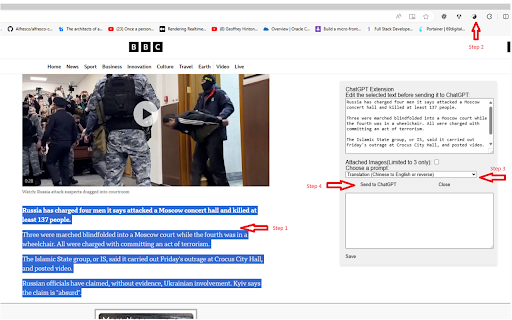
On any Chrome/Edge webpage, highlight the text you want to process with ChatGPT. Click the Taichi (black/white) logo located to the right of the browser's address bar, choose a Prompt, and click 'Submit.'
Configure your API key:
In the extension options, enter your email address.
You'll receive an email from [email protected] with the subject "Your Bearer Token" containing your API key.
Enter your API key in the extension options.
Customize your prompts:
Add custom prompts in the extension options, with one prompt per line, such as:
Translation: Chinese to English or reverse
Summary: Shorten the content
Extension: Give more detail
Reply: help to write response email
QA: simple answer question
Code: provide python code only for given message. No extra message needed
And more(You can add more prompt yourself)!
Please note that this extension interface is available only in the English language, but it allow you to write prompts in other languages, but symbol ":" would be English charactor.


