Boostr for Salesforce
by mattsimonis4.8
34 reviews
6.0K
users
Published
November 11, 2024
Screenshots



Description
Boost your admin and developer productivity on Salesforce.com with Boostr!
Current features include:
- Ability to search when adding items to a change set
- Filtering by type when adding to a change set
- Showing all items of a given type on one page when adding to a change set
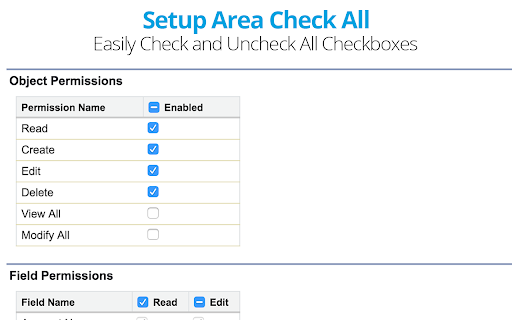
- Adding checkbox to table header in admin area to check and uncheck all items in that column
- Displaying the API Name next to field names when editing a field set
- Using Pascal Case for the API Name when creating new objects and fields
- Preventing the placeholder text from filling in the setup area sidebar
- Display number of selected fields on field history tracking page
- Ability to uncheck all page layouts by default when creating a new field.
- Convert Salesforce Id's from the app's popup menu.
- See additional system overview stats.
- Select Failed Tests to re-run in the Apex Test Execution page with the click of a button!
More features coming soon!
If you have a feature request or any feedback, tweet me @mattsimonis
Boostr is open source! Feel free to contribute! https://github.com/mattsimonis/boostr
Add to Chrome
Quick Info
- Version
- 0.999
- Size
- 1.17MiB
- Price
- Free
- Type
- Extension
Categories
Languages
English (United States)