
Random Tab Picker
by denesakin5.0
3 reviews
520
users
Published
August 26, 2024
Screenshots



Description
How to use the extension
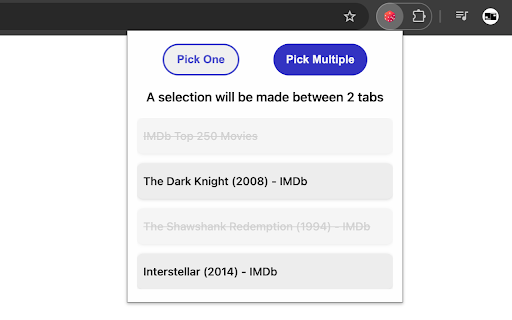
The extension shows a list of tabs that are currently open on your browser window. You can unselect tabs from the list by clicking on them*. Unselected tabs will not be a part of the random selection.
If you want the extension to pick only one tab, press the "Pick One" button and the extension will select a random tab and automatically switch to the tab it has selected**.
If you would like the extension to pick multiple tabs, press the "Pick Multiple" button and there will be a pop up on your screen asking how many tabs you would like the extension to pick. Enter the desired number of tabs to be picked and press the "OK" button. The extension will pick random tabs, create a tab group named "SELECTED" which contains the randomly picked tabs, and automatically switch to one of the tabs it picked. You can see the rest of the picked tabs within the tab group.
Notes:
* Tabs you unselect from the extension list will remain open on your browser
** If the active tab remains the same after you press the button, it means the tab you were on was picked.
Icon created by juicy_fish on flaticon.com
Source code: https://github.com/han-lue/random-tab-picker-chrome-extension