
Copy on Select
by micpob4.6
45 reviews
10.0K
users
Published
October 2, 2025
Screenshots



Description
🟢Select any text in a web page and it will be automatically copied to the clipboard (hold Ctrl to bypass, ⌘ on Mac).
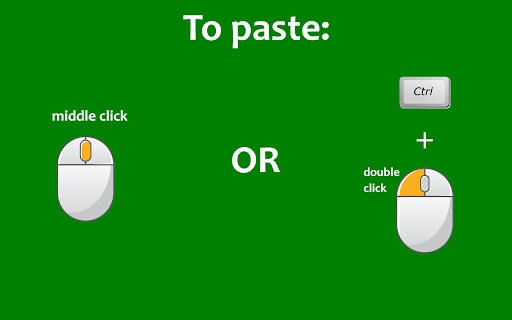
🟢You can also quickly paste the copied text by clicking on the mouse wheel, or by double clicking the left mouse button while keeping the Ctrl key pressed (⌘ on Mac).
🟢If you keep the Shift key ⬆ pressed while pasting, the field into which you are pasting will be emptied of all already existing text before pasting.
🟢Bypass the auto copy functionality in input fields (needs to be activated in the options page)
🟢Automatically add text before or after the copied text (needs to be activated in the options page)
🟢Automatically add the webpage URL to the copied text (needs to be activated in the options page)
✂-------------------------
🚨IMPORTANT🚨: please reload Chrome after installing the extension, in order to activate it.
- Click on the extension button to turn the extension on/off.
- Right click on the button to open the options page or the user guide.
🔎NOTE:
- The extension does not work on the New Tab page (the page that opens when you click on the + sign in Chrome). This is standard behaviour for all extensions.
- The extension does not work on pages whose URL starts with the word "chrome", for example chrome://extensions/ or chrome://settings/.
Add to Chrome
Quick Info
- Version
- 3.1
- Size
- 519KiB
- Price
- Free
- Type
- Extension
Categories
Languages
DeutschEnglishespañolfrançaisitalianopolskiportuguês (Brasil)