
Lil' Scribbler
by John Nolt5.0
1 reviews
70
users
Published
July 12, 2024
Screenshots
Description
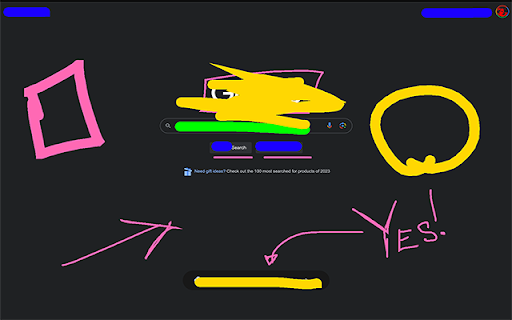
Li’l Scribbler is a Chrome extension that lets you draw, write, and annotate directly on web pages. It’s designed to be a companion when presenting over a video conference. The UI focuses on keyboard control to switch between tools and options quickly and never get in the way of your communication.
Quick Start
* Activate Drawing Mode: Click the Li’l Scribbler icon in your Chrome toolbar to enable the drawing tools.
* Select a Tool: Use the left arrow key to cycle through tools: Pen, Rectangle, Arrow, Text, and Eraser.
* Choose a Color: Press the right arrow key to switch between colors.
* Adjust Size: Use the up arrow to increase and the down arrow to decrease the size of your selected tool.
* Draw or Type: Click and drag to draw; click to place text, then type.
* Finish Up: Press Enter to finalize text entries. Press the Delete key to remove annotations.
* Deactivate Tools: Click the Li’l Scribbler icon again to turn off drawing mode.
===Detailed Features and Shortcuts===
Tools:
* Pen Tool: Freehand draw; ideal for highlighting or sketching.
* Rectangle Tool: Draw rectangles; click and drag to define the area.
* Arrow Tool: Click, drag, and release to create arrows pointing to specific items.
* Text Tool: Click to position your cursor and start typing. Press Shift+Enter for a new line.
* Eraser Tool: Wipe away the stuff you don’t want on the screen.
Color and Size:
* Colors Available: Hot Pink, Lime Green, Deep Ocean Blue, Hazard Yellow, Pitch Black. Toggle through with the right arrow.
* Size Adjustment: Increase with the up arrow, decrease with the down arrow.
Text Manipulation:
* Multiline Text: Shift+Enter to add new lines.
* Adjustable Text Size: Cmd+Up Arrow to increase; Cmd+Down Arrow to decrease.
* Moving Text: Hold Cmd, click and drag your text box. Finalize with Enter.
* “Finalize” Text: Enter/Return
Keyboard Shortcuts:
* Switch Tools: Left Arrow.
* Change Colors: Right Arrow.
* Tool Size: Up Arrow to increase, Down Arrow to decrease.
* Clear Annotations: Delete.
* Undo/Redo: Ctrl/Cmd + Z for undo, Ctrl/Cmd + Shift + Z or Y for redo.
Troubleshooting:
* Toggle Drawing Mode: If the tools aren’t appearing, try turning the drawing mode off and on again.
* Check Page Support: Li’l Scribbler won’t work on ‘chrome://’ or ‘chrome-extension://’ URLs. You'll see an "OFF" badge on the extension's icon if this is the case.