
Try-It-On
by Han Tran5.0
1 reviews
229
users
Published
June 23, 2024
Screenshots


Description
Try-It-On: Virtual Clothing Fittings Made Easy
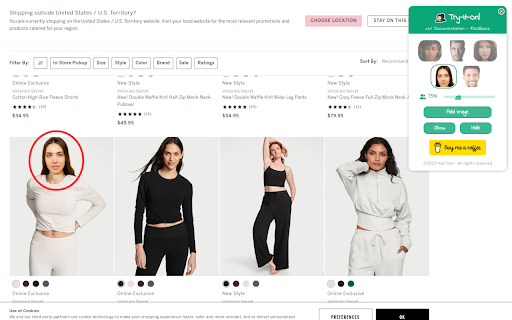
Shop smarter, look better, and make online fashion decisions with confidence. Try-It-On lets you preview clothing items on your own digital avatar, and ensuring a perfect match every time.
**** How To Use:
1. Open your favorite shopping site
2. Enable the extension to see the control panel
3. Click "Add Image" to select a face photo of yourself, your friends or your loved ones (for the best visualization, use a photo with only your face and transparent background)
4. Click "Show" to show the photo on the current site
5. Drag the photo to different outfit photos to preview
6. Adjust the photo size if needed by dragging the size ratio slider
7. Click "Hide" to remove the photo from the current site
**** Key Features:
- Face-Based Virtual Try-On: Select a photo of your face, and instantly see how any clothing item will look on you.
- Manual Resizing: Customize the size of your face photo to the appropriate proportion with outfit photos from online shopping sites, ensuring a precise visualization.
- Seamless Integration: Use Try-It-On's simple control panel directly within your current tab, making online shopping a breeze.