Dark Theme Tab
by Triplex-Media103
users
Published
August 23, 2023
Screenshots
Description
When people spend long days in front of their computers they often strain their eyes because of the long exposure to bright screen. With Dark Theme Tab you will be able to automatically view any website in dark mode and save your eyes.
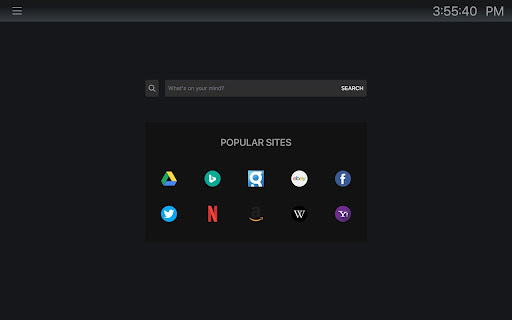
Each time you open a new browser tab, this extension will make sure your new tab opens in dark mode and when you search the web, your websites will also be shown in dark mode. Also we provide your with a handy search bar that lets you quickly search for information through Microsoft Bing search engine and quick links to popular sites.
Features:
- Dark mode by default
- Handy accessible search bar
- Handy quick links to popular sites
- Displays current time
By clicking 'Add to Chrome' and installing this extension, you are accepting and agreeing to install the Dark Theme Tab Chrome extension. I understand that by doing so, my browser's new tab will be set to that provided by the service with search results by Microsoft Bing, and the Privacy and Terms of Use.
Terms of Use: https://triplex-media.com/terms.html
Privacy Policy: https://triplex-media.com/privacy_policy.html
Add to Chrome
Quick Info
- Version
- 0.4.3
- Size
- 539KiB
- Price
- Free
- Type
- Extension
Categories
Languages
DeutschEnglishEnglish (United Kingdom)English (United States)FilipinoIndonesiaKiswahiliMelayuNederlandsTiếng ViệtTürkçecatalàdanskeestiespañolespañol (Latinoamérica)françaishrvatskiitalianolatviešulietuviųmagyarnorskpolskiportuguês (Brasil)português (Portugal)românăslovenčinaslovenščinasuomisvenskačeštinaΕλληνικάбългарскирусскийсрпскиукраїнськаעבריתالعربيةفارسیमराठीहिन्दीবাংলাગુજરાતીதமிழ்తెలుగుಕನ್ನಡമലയാളംไทยአማርኛ中文(中国)中文(台灣)日本語한국어