Other extensions from this developer
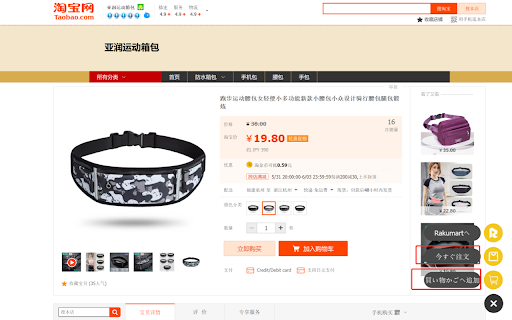
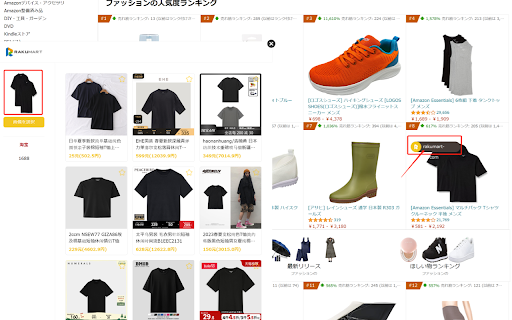
Rakumart代行サイト専用 中国タオバオ(taobao.com)及び中国アリババ(1688.com)詳細パージから Rakumart詳細ページを直接開く Rakumart買い物かごへ商品を追加できるツール そのほか、閲覧の画面から画像検索機能も追加 問題ある際は担当者までお問い合わせください。
Other extensions published on the same day
Say goodbye to complicated tools and endless online searches. The Image Converter is here to simplify your life, allowing you to transform the format of pictures in just a few clicks. Whether you’re dealing with PNGs, JPGs, WEBP or other formats, this tool makes converting images seamless and...
🎉 Welcome to Chat With Gemini, a revolutionary Chrome extension engineered to redefine your online experience. This powerful tool transforms your workflow by offering smart, intuitive features designed exclusively for modern users. 📝 How It Works: 1️⃣ Install the extension from the Chrome Web...
Effortlessly copy URLs from your open tabs! This extension extracts all tab URLs, removes duplicates with a single click, and copies the cleaned list to your clipboard for easy sharing or saving. Version 1.1 enables you to find all links within the currently opened tab.
WorkPilot helps freelancers and agencies maximize their Upwork success with powerful tools to streamline the proposal process. Key Features: • Extract job and client details automatically • Generate tailored, professional proposals with AI • Save and manage your proposals for future reference •...
"Transform your browsing experience with the stunning 'Attack on Titan Levi' Chrome Theme! Immerse yourself in the captivating world of the beloved anime series, featuring the iconic character Levi Ackerman. This theme is perfect for fans who admire Levi's fierce determination and unparalleled...
Auto Clicker for Follow Buttons is a Chrome extension that automates clicking on “Follow” or “Following” buttons on Substack pages. It streamlines your subscription process by detecting and clicking these buttons for you, saving time and effort while keeping you updated with the latest posts...
- Messages appear as semi-transparent bubbles of text. - The message input area is invisible by default but shows up when you hover over the bottom area of the chat, or when you type something into it. - The overlay is on the left side of the screen by default, but can be moved by dragging the...
Xplore3 is an advanced AI-powered Google Chrome extension designed to enhance X account management through AI-driven intelligence, data scraping, and Alpha Scouting. It helps users analyze on-chain data, track trends and watch accounts, and optimize decision-making. ⏪Prev name & Mentioned...