
Creative Image Clipper
by Pada X2.7
35 reviews
2.0K
users
Published
January 5, 2018
Screenshots



Description
What's new: 2014/04/09
1. Open/Edit image from local files is supported.
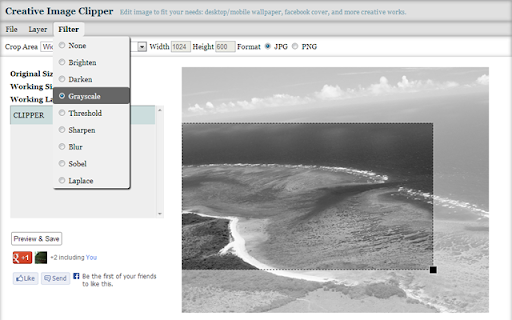
Edit image to fit your needs:
1. Choose an existing image from Google Drive or your computer.
2. Select what you want: desktop standard/wide wallpaper, android landscape/portrait wallpaper, iphone/ipad wallpaper, facebook cover, and custom image size.
3. Drag to move/resize crop area.
4. Apply filters: grayscale, sharpen, and etc.
5. Add some text layers if you like.
6. Add some effect layers if you like.
7. Apply transformation: Rotate or Flip.
8. Select output format: JPG or PNG.
9. Download output image or save to Google Drive.
Supported image formats: JPG, PNG
-------------
Release Notes:
2013/11/29
1. Support image transformation: Rotate and Flip.
2. More customized filters: You can adjust output effects of filters from now on.
2013/10/18
1. Text layer: Define stroke color and weight. Support fill by transparent(No fill color).
2. Effect layer: Support two special effects: Highlight and Mosaic.
2013/07/10
1. Redesign app interface.
2. Text layer: Add your own text with various setting.
Add to Chrome
Quick Info
- Version
- 1.0.1.1
- Size
- 9.46KiB
- Price
- Free
- Type
- Extension
Languages
EnglishEnglish (United Kingdom)English (United States)中文(台灣)日本語