mima omnibox
by Riad .ZPublished
March 19, 2023
Screenshots


Description
# JUST FOR CHROME BROWSER
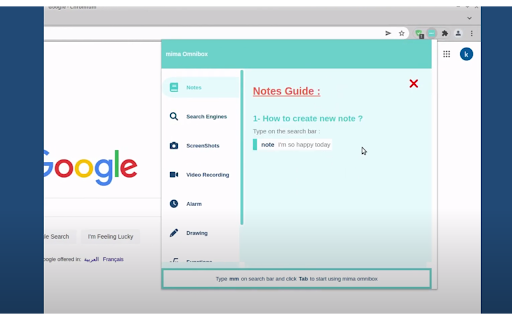
Our Chrome extension aims to enhance your browsing experience by offering a range of features accessible via short commands from the search bar. You can easily customize these features using the intuitive dashboard, and we provide detailed documentation for each tool to ensure you can make the most of its functionality.
#FEATURES:
Notes : Add notes with simple command from the search bar.
Search Engines: Make your search more productive with default and custom searches.
Screenshots: Take screenshots of the page or even elements from the page.
Video Recording: Record your computer screen quickly and save the video.
Alarm: Set your alarm with simple command and with different formats.
Drawing: Draw on the page and save the image.
Functions: Cool feature that help you create functions and use it with parameters from the search bar and get the result.
Auto Form Filler: Create template from web form and fill it automatically.
#COMMANDS EXAMPLES:
note your_note
ytb search_text , twtr search_text, yndx search_text
cptr image_name , cptrp image_name
rec video_name
alrm 20:35t alarm_text
draw image_name
func add 7,13
frm
fill form_name
AND MORE ....
You can add commands to some features
❤️ JUST TRY IT AND YOU WILL LOVE IT ❤️