Safeguard (SafeBrowse AI)
by CyberHeroez CIC5.0
1 reviews
3
users
Published
December 4, 2025
Screenshots



Description
Title
Safeguard (SafeBrowse AI)
Short Description
On-device safeguarding for families and schools. Block adult sites, enforce SafeSearch, blur risky media, Focus/Classroom modes, healthy nudges, and PIN-protected overrides.
Full Description
Safeguard helps families and schools reduce exposure to harmful content without sending browsing data anywhere. It blocks adult sites, enforces SafeSearch on Google/Bing, blurs risky images/videos on the page, and adds Focus/Classroom modes with gentle on-device nudges. No telemetry is collected.
Features:
- Advanced heuristics: weighted URL/title/meta/body scoring with adjustable sensitivity
- On-page protection: optional Aggressive mode to blur/pause images and videos in the tab
- Visual detection: on-device image heuristics boost scores when explicit imagery appears even without text
- Focus & Classroom modes: block social/streaming, enforce SafeSearch, and allow only approved YouTube playlists
- Healthy nudges: optional wellbeing reminders for long social sessions or near the end of Focus blocks
- Safeguarding digest: download weekly CSV summaries for DSLs, governors, and audit trails
- Override alerts: optional PIN-protected webhooks (Slack/Teams/etc.) whenever a PIN override is approved, including approver name
- Domain blocklist: packaged defaults plus user-importable lists; allowlist trusted domains in seconds
- SafeSearch enforcement (Google/Bing) via Declarative Net Request (DNR)
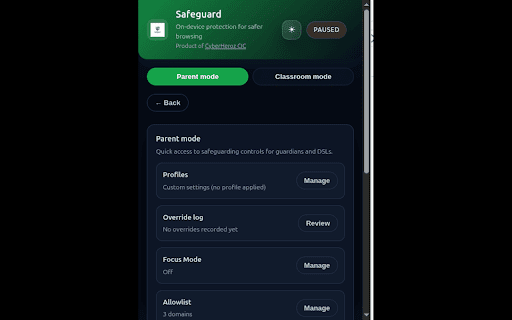
- Manual overrides and allowlist edits locked behind a private PIN with an on-device reason log
- Age-based profiles for EYFS through post-16 so schools can apply presets with one click
What’s new in 0.3.3:
- Healthy nudges (optional) with Focus end reminders and long-session social prompts
- Refreshed popup layout with control grids and easier parent navigation
- Updated store copy and manifest description for Chrome Web Store submission readiness
Privacy:
- No telemetry or external requests for detection
- Uses `storage`, `declarativeNetRequest`, `tabs` (show host in popup), and `alarms` (timers for Focus/nudges)
- See the full policy: https://github.com/DipesThapa/safebrowse-ai/blob/main/PRIVACY.md
- Optional override webhooks send only the override event you configure to your own endpoint (off by default)
How to use:
1) Install and open the popup; toggle Enable (badge shows ON)
2) Optional: toggle Aggressive mode and adjust Sensitivity
3) Optional: paste domains (one per line) into Blocklist → Import/Replace; use Allowlist to override
Notes:
- Very large blocklists may exceed Chrome’s dynamic DNR capacity; core heuristics still protect
- Cross-origin videos may block pixel reads; visual sampling is skipped in those cases