
Bye Bye, Google AI: Turn off Google AI Overviews, Discussions and Ads
by geekinchief4.4
410 reviews
90.0K
users
Published
December 1, 2025
Screenshots
Description
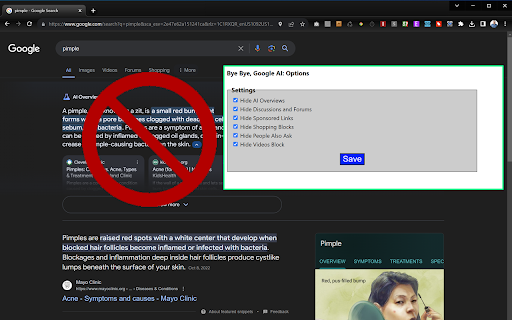
Don't like the new Google AI overviews appearing in your search results? Perhaps you don't like the discussions section or the shopping blocks or even the sponsored links? This extension lets you hide them. It simply uses CSS to set those areas of the page to be hidden (display="none").
AI overviews are hidden by default but the options menu lets you choose what else you might want to hide: Videos, Discussion blocks, shopping blocks, "readers also ask" and sponsored blocks are also available to hide. Note that, if Google changes its CSS, we'll have to update the extension to keep pace.
You can also search the Google web results tab from your address bar by hitting w + space and then entering your query.
Version 2.1: Adds new "What people are saying" section as an option.
Version 2.0: Eliminates new mid-page (after the first result) AI Overviews
Version 1.8: Fixes bug where AI overviews that appeared in the middle of the page were not being blocked.
Version 1.5: Adds support for Danish, Portuguese and Dutch. Fixes bug where blocking video sometimes blocked other blocks on People pages.
Version 1.4: Adds support for 16 languages including English, French, German, Spanish, Korean, Japanese, Mandarin (Trad + Simplified), Arabic, Hebrew, Urdu, Hindi, Thai, Greek, Italian, Polish and Russian.
Add to Chrome
Quick Info
- Version
- 2.1
- Size
- 175KiB
- Price
- Free
- Type
- Extension
Categories
Languages
English (United States)