Inbox Zero Tabs for Gmail
by Inbox Zero5.0
3 reviews
865
users
Published
October 16, 2025
Screenshots


Description
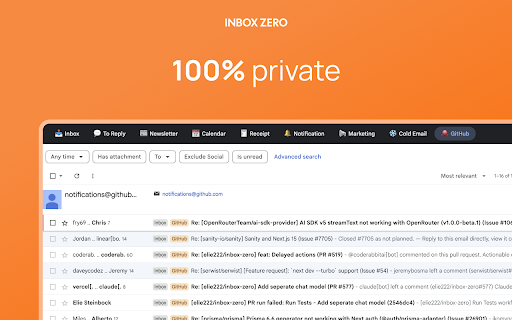
Transform your Gmail experience with customizable tabs that help you achieve inbox zero faster. 100% private.
Inbox Zero Tabs integrates into Gmail's interface, adding a powerful tab system that lets you organize emails exactly how you want. Whether you're managing multiple projects, filtering newsletters, or tracking important conversations, our extension makes email management effortless.
Set Gmail labels or Gmail filters as tabs. Bringing Superhuman split inbox to Gmail.
Auto-label using Inbox Zero AI Assistant at https://getinboxzero.com
✨ KEY FEATURES:
📁 SMART ORGANIZATION
• Add custom tabs with any Gmail search query
• Pre-configured tabs for common workflows (To Reply, Newsletters, Receipts, and more)
• Works with all Gmail features and labels
🎨 BEAUTIFUL DESIGN
• Perfectly matches Gmail's interface
• Dark/light theming
• Clean, distraction-free design
👥 MULTI-ACCOUNT SUPPORT
• Separate settings for each Gmail account
• Automatically detects active account
• Seamless switching between accounts
🔍 POWERFUL SEARCH INTEGRATION
• Use any Gmail search syntax
• Filter by labels, sender, subject, or attachments
• Combine multiple search criteria
• Optional unread-only filter for all tabs
⚡ EASY TO USE
• Simple one-click setup
• Intuitive settings popup
• Add, edit, or remove tabs anytime
• No account creation required
📊 EXAMPLE USE CASES:
• "To Reply" - Emails you haven't responded to yet
• "Newsletters" - All your subscriptions in one place
• "Receipts" - All your receipts
• "Team" - Emails from specific domains or teams
• "Important & Unread" - Priority emails needing attention
• "Large Attachments" - Files over 10MB
🔒 PRIVACY FIRST
• 100% private
• No data collection or tracking
• No external servers
• All settings stored locally
• Works entirely within your browser
Perfect for professionals, students, and anyone looking to tame their inbox. Install now and experience a cleaner, more organized Gmail!
Extend the functionality even more by using the Inbox Zero email assistant at https://getinboxzero.com!
Add to Chrome
Quick Info
- Version
- 1.0.3
- Size
- 387KiB
- Price
- Free
- Type
- Extension
Categories
Languages
English (United States)