Simple Translate
by Sienori4.5
428 reviews
200.0K
users
Published
May 15, 2024
Screenshots




Description
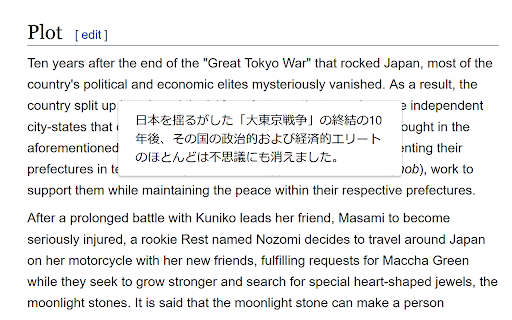
When you select text, the translation button pops up and the translation is displayed instantly.
If you enable "Do not display the button if translation is not required" option, you will not get frustrated by the button appearing when it is not necessary.
In the toolbar popup, translate the input text in real time.
If you enable "Automatically switch to the second language" option, you can do : When English is input, it is translated into Japanese, and when Japanese is input, it is translated into English.
You can also translate from the context menu.
You can select "Translate this page", "Translate selected text", and "Translate selected link" from the menu on the page or tab.
Supports Google Translate and DeepL API.
Firefox version: https://addons.mozilla.org/en/firefox/addon/simple-translate/
Edge version: https://microsoftedge.microsoft.com/addons/detail/cllnohpbfenopiakdcjmjcbaeapmkcdl
Add to Chrome
Quick Info
- Version
- 3.0.0
- Size
- 420KiB
- Price
- Free
- Type
- Extension
Categories
Languages
DeutschEnglishFilipinoIndonesiaNederlandsTiếng ViệtTürkçecatalàdanskespañolfrançaisitalianomagyarnorskpolskiromânăsuomisvenskačeštinaΕλληνικάбългарскирусскийсрпскиукраїнськаעבריתالعربية中文(中国)中文(台灣)日本語한국어