Bitbucket PR review
by alexian8535.0
1 reviews
22
users
Published
June 11, 2024
Screenshots


Description
As a developer, you may need to notify your team to review your pull request in different instant messaging, such as Slack, Microsoft Teams, etc.
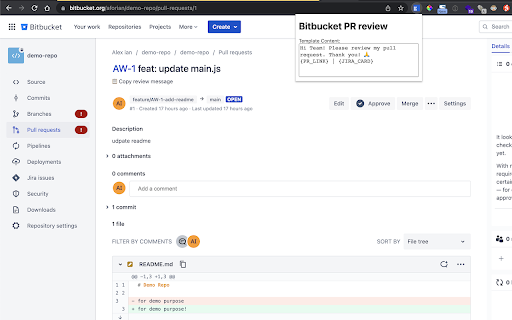
Bitbucket PR review provide a easy way to copy PR link and related Jira Card link with customize template.
Basic usage:
1. Go to the bitbucket pull request page that you want to get review
2. click "📋 Copy review message" to copy message
3. message can be paste to slack
How to customize text template:
1. click the extension icon on toolbar to show the popup
2. update the template in the popup
Special template key:
1. {PR_LINK}
You can place {PR_LINK} in the template to represent the pull request link. It will capture the url in current window as the pull request link.
2. {JIRA_CARD}
You can place {JIRA_CARD} in the template to represent the Jira card link. It will use the Jira card number and link on the pull request header as the linked text and link.
3. {PR_HEADER}
You can place {PR_HEADER} in the template to represent the pull request header content. It will use the pull request header content and remove the Jira card link content.
4. {JIRA_HEADER}
You can place {JIRA_HEADER} in the template to represent the related Jira card title content.