Letterbot AI
by nikolashaag5.0
1 reviews
690
users
Published
April 27, 2023
Screenshots

Description
Generate emails with AI
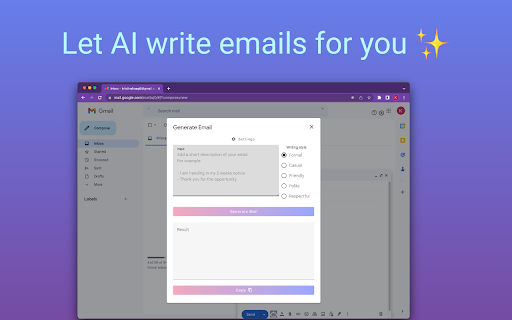
This free Chrome extension does all the tedious writing for you. You just have to throw in a couple of sentences about what the email should be about, and the extension does all the writing for you. You just have to choose the right tone of voice for the occasion. No need to think about spelling, grammar, or any formalities.
~~~~~~~~~~~~~~~~~~~~~~~~~~~~~~~~~~~~~~~~~~~~~~~~~~~~~~~~~~
Here are the advantages of this tool:
✔️ High-quality responses using advanced AI language models
✔️ Compatible with Gmail
✔️ English and German language are supported
✔️ Fixes any typos you might have
✔️ Accessible button right where you need it when composing emails
✔️ Can be turned on or off at any time
✔️ Privacy-friendly
~~~~~~~~~~~~~~~~~~~~~~~~~~~~~~~~~~~~~~~~~~~~~~~~~~~
HOW TO USE ON GMAIL
1. Open Gmail
2. Create a new email
3. Click the "Letterbot AI" icon next to the "Send" button
4. The Letterbot dialog will open
5. Give a few short sentences about what the email should be about
6. Insert the generated email back into the email editor
~~~~~~~~~~~~~~~~~~~~~~~~~~~~~~~~~~~~~~~~~~~~~~~~~~~
FAQ
Which languages are supported?
German and English
Is there a desktop version of this extension?
Yes, you can also go download the desktop version with more features for free on the linked website.
~~~~~~~~~~~~~~~~~~~~~~~~~~~~~~~~~~~~~~~~~~~~~~~~~~~
What is your privacy policy?
This tool respects your privacy and does not use ads, cookies, or third-party trackers.