
One Click Internal Link Finder
by Suvaance3.0
6 reviews
813
users
Published
October 13, 2022
Screenshots


Description
One-Click Internal Link Finder offers the best opportunity for internal link optimization.
Internal linking is considered to be an important part of your on-page optimization process. If done correctly, it may give you additional ranking boost. But very often, website owners don’t have clue whether they are doing it properly or not.
Are you doing it in the right way?
How do you decide which page is the best one to link to a relevant keyword in your content?
And in big websites, content developers face great challenge doing internal linking.
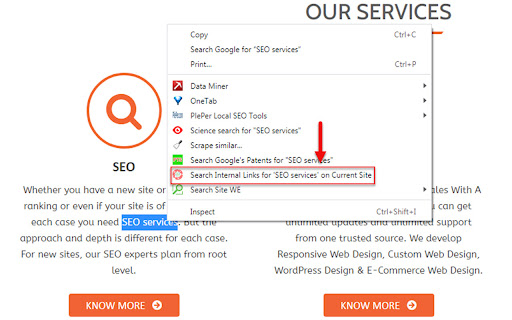
Suvaance comes with a unique solution to this problem with One Click Internal Link Finder. Google brought Link as a solution for a new ranking system. So, why not let Google do the link finding work for you? That’s what this extension does for you.
★ Open any page of your site.
★ Choose any keyword (or simply word) from the content.
★ Right click on it.
★ From the option, click “Search Internal Links for * on Current Site”.
★ It will lead you to Google search page, where Google shows all those pages in your site that are relevant to the selected term.
We know Google shows the best page for a query. That means pages you are seeing in the result are the best ones to link to your search term. You may link to any of the top results.