Fontmark
by Nissan Ahmed4.3
4 reviews
220
users
Published
August 24, 2023
Screenshots

Description
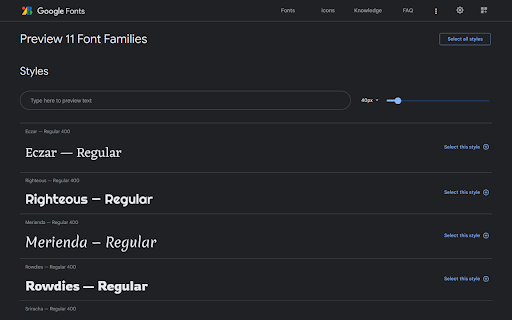
Each collection is a simple bookmark where you can add as many fonts as you like. These collections of fonts can be previewed in a single page on Google Fonts website.
Bookmark collections are initially saved in a folder named "Fonts", but it can be moved anywhere else. You can also view or edit the collections from anywhere.
To add or remove a specific font from a collection, visit the Google font's page such as https://fonts.google.com/specimen/Roboto and use the extension menu.
You can also import all the fonts from one collection to another or remove them from an existing collection if you open the extension menu on the collection preview page on Google Fonts website.
This extension doesn't collect any data and the code is open source on GitHub.
Add to Chrome
Quick Info
- Version
- 1.3
- Size
- 27.77KiB
- Price
- Free
- Type
- Extension
Categories
Languages
English (United States)