
Easy Speed Drag Netflix
by CMDEV5.0
1 reviews
32
users
Published
April 1, 2024
Screenshots

Description
🔴 This is the Netflix version of the "Easy Speed Drag For YouTube" extension, available here:
🌐 https://chromewebstore.google.com/detail/lmcggcabhocpfkbddekmconplfjmmgmn
Speed Controls For Netflix Videos:
------
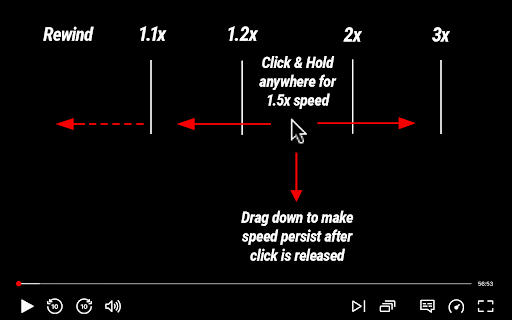
⏩ Click and hold anywhere on a Netflix video to play at 1.5x speed
➡️ Drag right for faster speeds.
⬅️ Drag left for slower speeds.
⬇️ Drag down before releasing the click to lock in the new speed.
▶️ Or, just release the click to return to normal speed.
*️⃣ To return to normal speed after you've locked in a new speed, just hold down a new click and release.
🎛️ Set the speeds tiers you want in the settings (anywhere from 0.1x to 16x)
Key Features:
------
🧠 Incredibly Intuitive - Works exactly how you expect it to
⏭️ Skim Over The Boring Stuff - Easiest way to fast forward over bits of boring content
😃 Don't miss The Good Stuff - Never miss things you want to see by accidentally skipping over it. Easy to stop exactly when you want.
🥷 Never In Your Way - Extension adds features but does not interfere with any native features. It's only there when you want it to be.
What Else?
-
✅ No data collection
✅ No ads or monetization
✅ Minimal Permissions