QuickAccess Sidebar
by MK5.0
4 reviews
47
users
Published
October 23, 2025
Screenshots

Description
🚀 QuickAccess Sidebar v1.3 - Major Update
New Features:
🌙 Dark Mode: Toggle between light and dark themes
📍 Position Control: Move sidebar to left or right side
⏰ Auto-Hide Toggle: Keep sidebar always visible or auto-hide
⚙️ Settings Panel: Easy access to all customization options
*Please restart the browser once so the sidebar loads on all tabs*
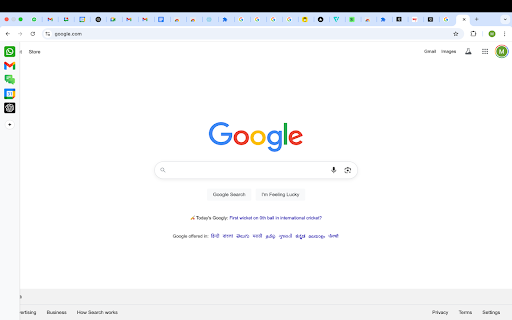
*You will see the sidebar only when you take the cursor to the left edge of the screen or if you use any shortcut*
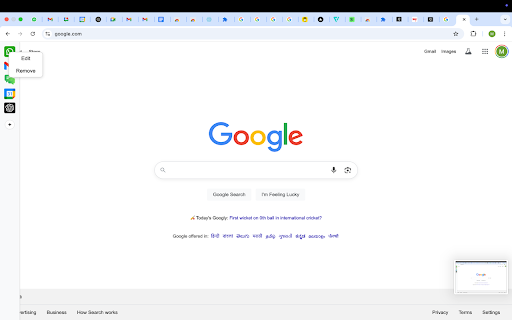
*To edit shortcuts, go to chrome://extensions/shortcuts*
QuickAccess Sidebar is a lightweight, customizable sidebar for quick access to your most-used web tools.
Add shortcuts to:
- Gmail
- WhatsApp Web
- Google Calendar
- ChatGPT
- Any other URL
Features:
- Up to 10 configurable shortcuts
- Custom icons
- Keyboard shortcut support
- Persistent across sessions
- Auto-collapses after opening - designed to stay out of your way
📌 Notes:
- All shortcuts are opened as pinned tabs within the browser. There is no option within chrome for opened tabs to not show up as a tab
- To edit shortcuts, go to: `chrome://extensions/shortcuts`
- The sidebar collapses automatically after use.
This is intentional - loading websites inside the extension frame causes compatibility issues.
We’ve optimized for a smooth, unobtrusive experience.
No ads. No tracking. No clutter.