GMailSend Address Checker
by SEYA.WORK4.2
19 reviews
100.0K
users
Published
October 7, 2022
Screenshots


Description
Check recipient and subject when sending GMail mail. (C)SEYA.WORK
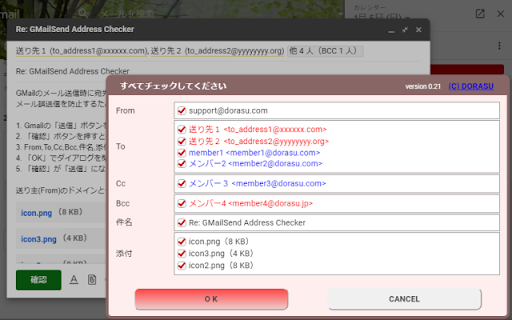
Displays a confirmation dialog to prevent erroneous mail transmission.
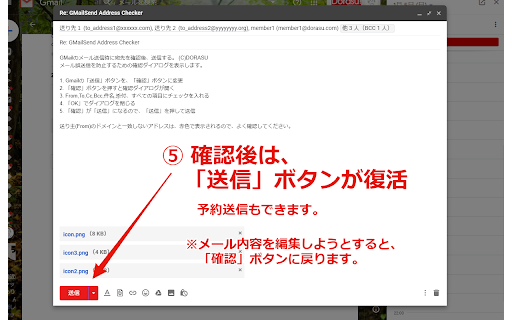
1. Gmail "Send" button changed to "Confirm" button.
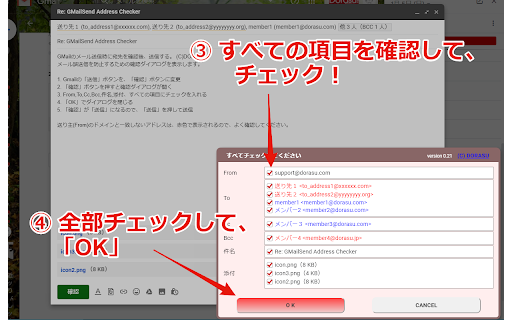
2. Press the "Confirm" button to open a confirmation dialog.
3. Check From, To, Cc, Bcc, Subject, Attachment, All Items.
4. Close the dialog with "OK".
5. "Confirm" will be "Send", so press "Send" to send.
Addresses that do not match the sender's (From) domain are displayed in red, so check them carefully.
Version: 0.25.0
* Fixed a bug that was not working in Google Works.
* Made it possible to donate to the author.
Version: 0.24.2
* Changed copyright. (Transition of rights from DORASU to SEYA.WORK)
Version 0.24.1
・Add a button to donate to COVID-19 Medical
Version 0.24.0
・Can now be used together with "Mailtrack for Gmail"
Version 0.23.2
・Multilingual
English, 中文 (繁體), 한국어, Tiếng Việt, 中文 (简体), Deutsch
Version:0.23
・Fixed check box not working with tab or space key.
Add to Chrome
Quick Info
- Version
- 0.28.1
- Size
- 22.11KiB
- Price
- Free
- Type
- Extension
Categories
Languages
DeutschEnglish (United States)Tiếng Việt中文(台灣)日本語한국어