Map Making App - Extras
by SHYLY5.0
2 reviews
446
users
Published
July 12, 2025
Screenshots


Description
============== FEATURES ==============
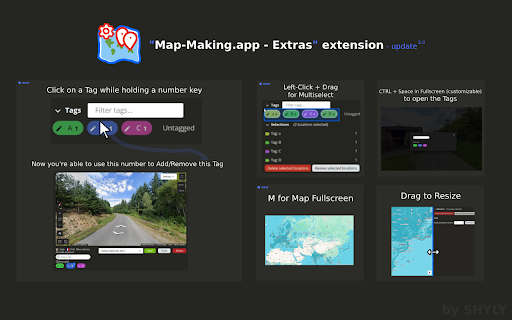
- Adjust the map/preview size by dragging between both sections
- Add tags using number or numpad keys (1–9)
- Assign a dedicated number shortcut to a Tag (Number + Left-click on a Tag, Esc + Left-click to remove)
- Focus the input field (Ctrl+Space / Alt+Space on Mac) *
- Open the Tags dialog in Fullscreen (Ctrl+Space / Alt+Space on Mac) *
- Toggle Map Fullscreen (M)
- Multi-select Tags by left-clicking and dragging with your mouse
* The Shortcut for Tag Dialog / Focus input field is customizable in the browser extension shortcuts
(chrome://extensions/shortcuts for Chrome)
=============== NOTES ===============
- You can toggle the extension on or off anytime by clicking its icon (reload required)
- This extension is built exclusively for https://map-making.app and works only on that site
- No data is saved or stored